Top 11 PSA Software (Paid & Free) – Buyer’s Guide for 2026

Finding the right PSA software can get messy fast, especially when half the lists out there repeat the same tools without showing what they are actually good at, or don’t offer any choosing advice.
This guide cuts through that by reviewing 11 professional services automation platforms based on best fit, key features, and review-based pros and cons, so professional services organizations can narrow the shortlist faster.
You will also get a buyer-friendly comparison table, a practical framework for choosing the right fit, and a migration checklist you can forward to your team.
What Are the Best PSA Tools to Use in 2026?
The best PSA tools to use in 2026 are Productive, Kantata, NetSuite OpenAir, Certinia, Deltek, Replicon, BigTime, Elorus, Birdview PSA, Accelo, and BQE CORE.
Each tool fits a different delivery model, from finance-first enterprise setups to teams that need tight control over staffing, time capture, billing, and profitability.
A Short List of the Best PSA Software
A Comparison Table of the Best PSA Platforms
| Tool | Best for | Choose this if | Skip this if | Free version |
|---|---|---|---|---|
| Productive | All-in-one operations across projects, staffing, and finances | You want delivery, budgets, capacity planning, forecasting, AI-powered workflows, time, billing, and reporting in one system | You have a small team and only need a simpler point solution | No |
| Kantata | Advanced capacity planning and forecasting | Forecasting accuracy and resource control matter most | You need something lighter and faster to learn | No |
| NetSuite OpenAir | Enterprise finance alignment and project controls | Finance and delivery need stronger control over hours, billing, and approvals | You want cleaner UX and easier day-to-day capacity planning | No |
| Certinia | Salesforce-based delivery and revenue tracking | Salesforce is already central to how work gets sold and delivered | You do not want to depend on Salesforce | No |
| Deltek | Compliance-heavy and multi-entity organizations | Reporting structure and firm-wide oversight matter more than speed | You want lighter workflows and easier usability | No |
| Replicon | Accurate time tracking and utilization visibility | Bad time data is the main problem to solve | You need broader PSA planning and delivery workflows | No |
| BigTime | Billing workflows tied to hours and expenses | Time, billing, and invoicing are the biggest pain points | You need stronger planning and more flexible reporting | No |
| Elorus | Smaller teams that need invoicing, time tracking, and project cost visibility | You want a simpler tool for billing, time, and project costs | You need deeper PSA workflows and more room to scale | Yes |
| Birdview PSA | Visual resource planning and workload balancing | You need better visibility into workload, projects, and team activity | You need deeper built-in reporting and tighter admin control | No |
| Accelo | Connecting client work, delivery, and billing | Handoffs between account management, delivery, and invoicing are breaking down | You want faster setup and less admin complexity | No |
| BQE CORE | Accounting-led project and profitability tracking | Billing, project numbers, and margin visibility matter most | You want cleaner UX and faster day-to-day workflows | No |
How We Chose These Tools
These tools were selected based on real PSA capabilities across resourcing, time tracking, billing, project financials, and real project management workflows, not just generic feature lists.
The shortlist was built by reviewing consistent patterns across G2, Capterra, YouTube walkthroughs, and Reddit discussions to understand how teams actually use these tools in day-to-day delivery.
1. Productive – Best for All-in-One Operations for Professional Services
Productive is the strongest option on this list for professional services teams that want to run projects, budgets, staffing, time tracking, billing, and reporting in one system.
It is built for teams that are tired of managing delivery in one place, financials in another, and everything else in spreadsheets.
Try Productive’s PSA solution
Replace Disconnected Tools With One Source of Truth
Many teams start looking for a PSA because their current setup is split across too many tools. Resourcing sits in one app, time tracking in another, finance in another, and reporting ends up patched together manually.
That creates lag, duplicate work, and too many moments where nobody is 100% sure which number is right.
In Productive’s project management, budgets, time, staffing, invoicing, and reporting are in the same data model. This means that the time logged by the team updates budget burn, profitability, and billing without a manual reconciliation step. That matters because the real benefit is not just fewer tools. It is fewer blind spots.
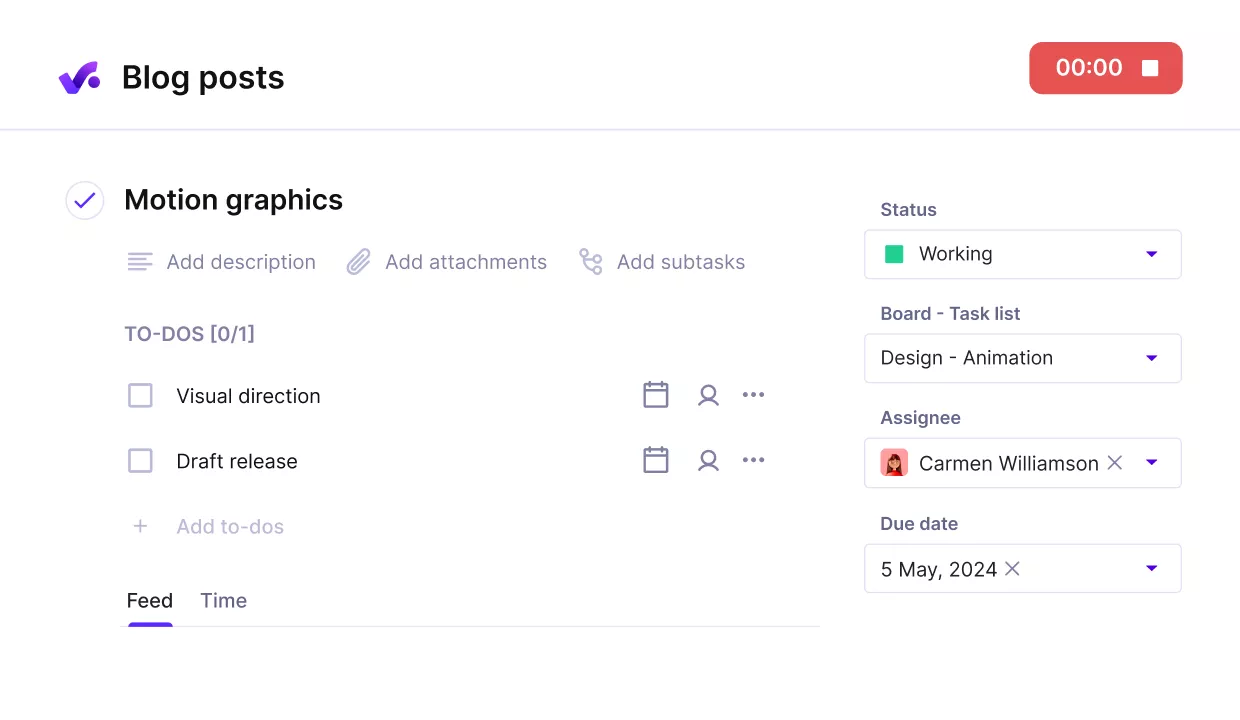
Source
See Project Profitability While Work Is Still in Motion
Many agencies can only tell whether a project was profitable after the damage is already done. By then, the team has already over-serviced, hard costs have already piled up, and the margin problem is something finance discovers at month-end instead of something delivery can act on earlier.
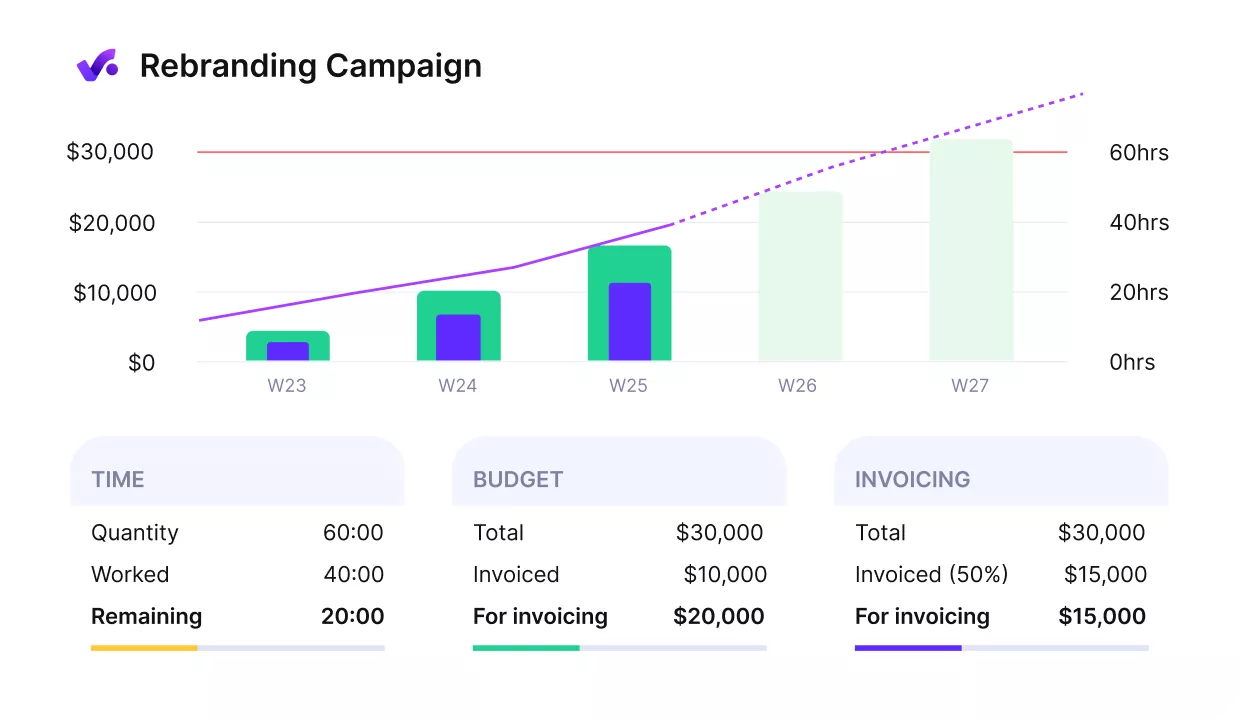
Get early warnings of budget overruns.
Productive’s budgeting setup gives teams a live view of planned versus actual revenue and costs as work happens.
Budgets can be structured by service, burn can be tracked at task and project level, and expenses can be added directly to the project so third-party costs are not floating outside the margin picture.
That makes it easier to spot overrun, retainer consumption, weak project economics, and shrinking profit margins before they turn into write-offs.

Plan Capacity Before Staffing Problems Become Expensive
Staffing problems get expensive fast when teams cannot see clearly who is overbooked, who has room, or when bench time is coming. That is how companies end up scrambling for freelancers, missing delivery risks, or carrying underutilized capacity without realizing how much it costs.
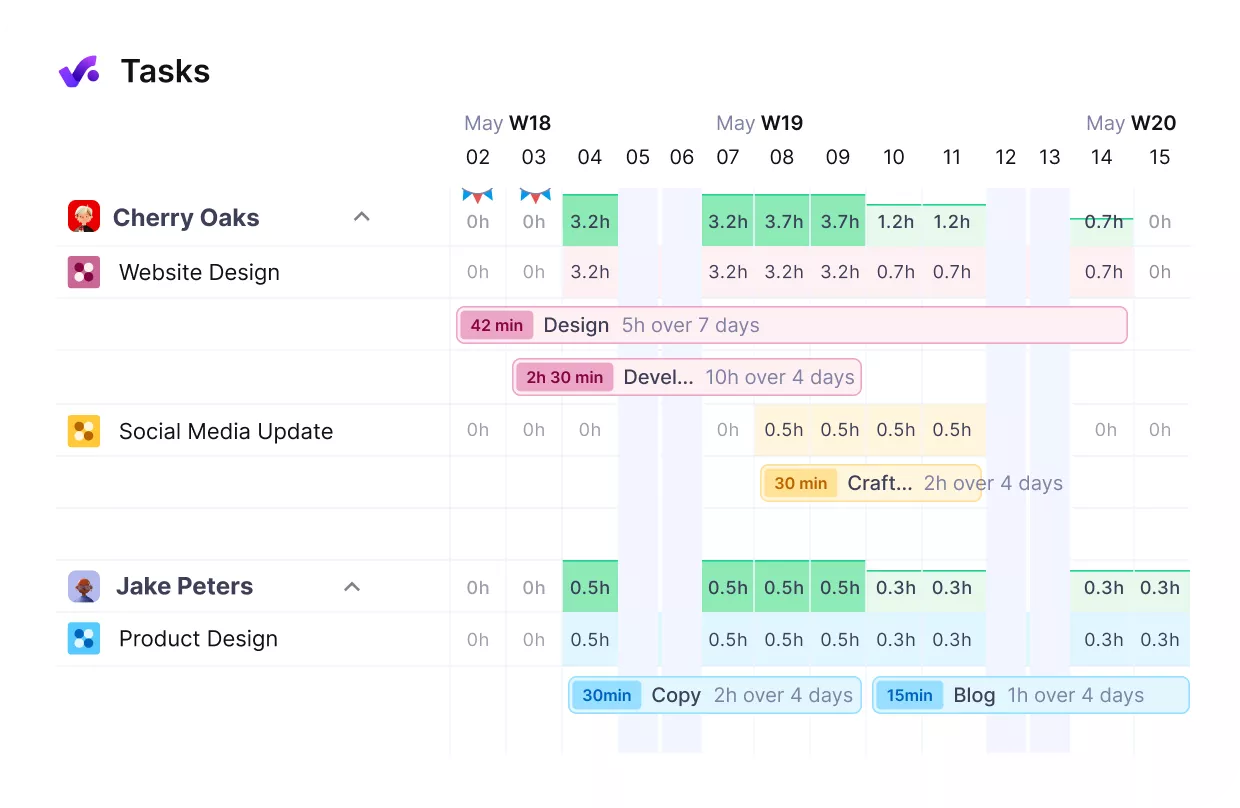
Manage your team’s workloads form a single view.
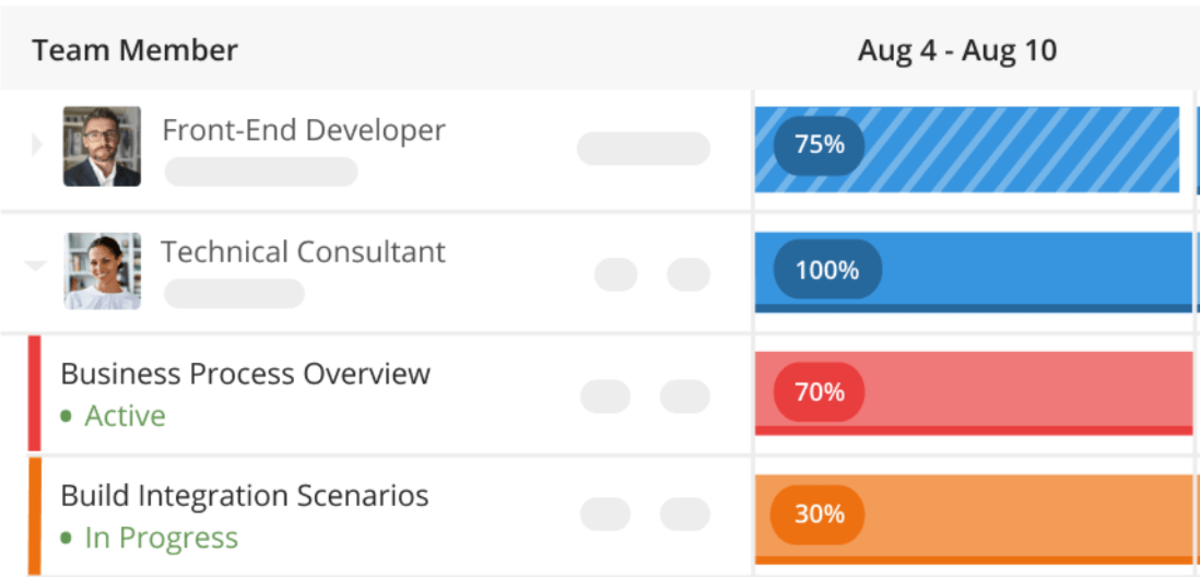
Productive’s resource planning view is built to make those decisions easier. Managers can see resource allocation by person, who is booked, at what percentage, on which projects, and for how long.
Soft bookings also help teams plan around pipeline work before a deal is signed. On top of that, utilization reporting gives operations and finance a clearer picture of billable versus non-billable time across the business.

Get real-time updates of your available resources.
Make Time Tracking and Invoicing Easier to Trust
Time tracking becomes a real problem when it is disconnected from the actual work. People log time late, log it vaguely, or treat it like admin work that happens after delivery. Once that happens, invoicing becomes harder too, because finance is working from incomplete or low-trust data.
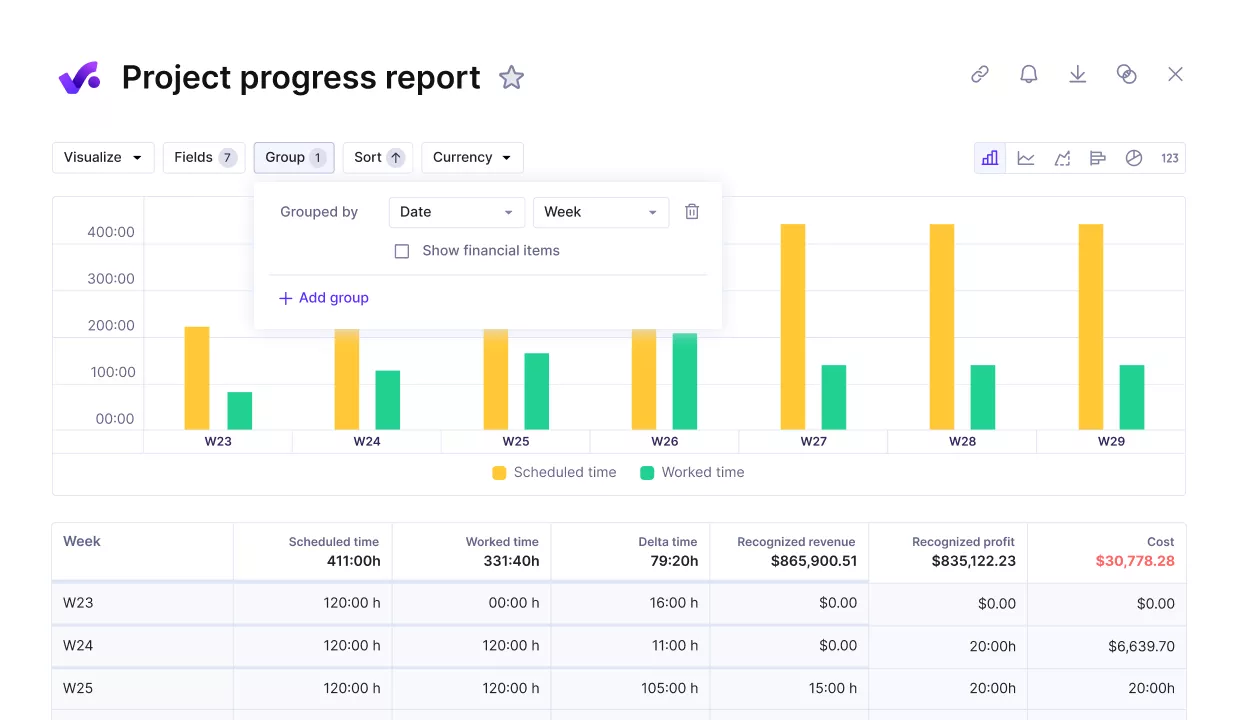
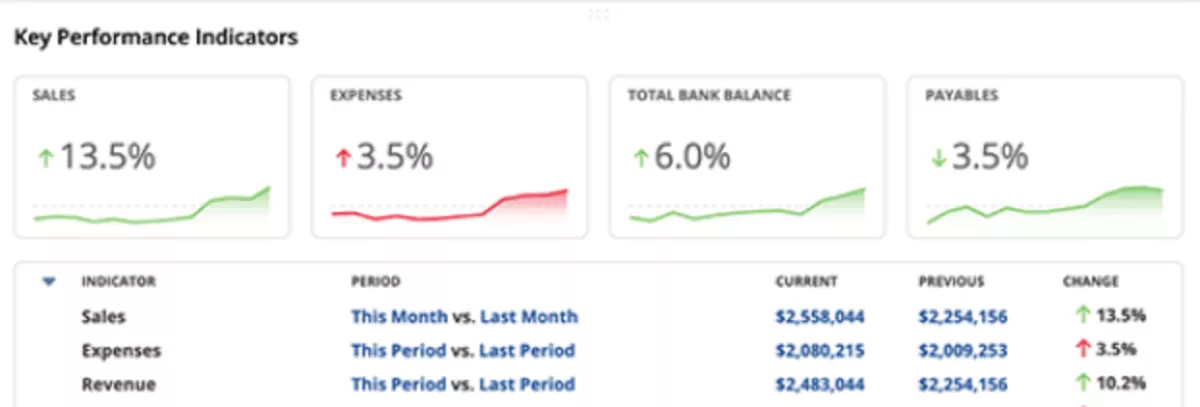
Track project progress against key performance metrics.
In Productive’s time tracking, the time logs are inside the same workflow as tasks, budgets, and approvals. People log time against the work they are already doing, managers can approve it, and the same entries flow into budget burn and invoicing.
That gives teams a cleaner path from delivery to finance, with less manual calculation and less risk of missed billable work.
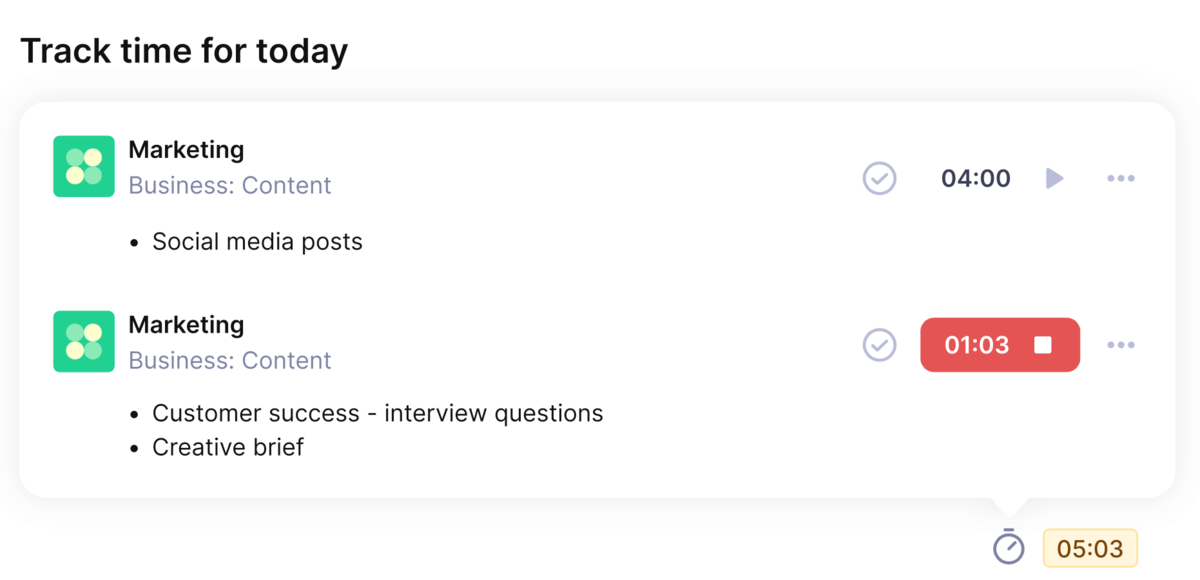
Use Productive’s automatic time trackers for smooth and accurate time tracking.
Pricing
- Plans start with the Essential plan at $10 per user per month, which includes essential features such as budgeting, project & task management, docs, time tracking, expense management, reporting, and time off management.
- The Professional plan includes custom fields, recurring budgets, advanced reports, billable time approvals, and much more for $25 per user per month.
- The Ultimate plan has everything that the Essential plan and Professional plan offer, along with the HubSpot integration, advanced forecasting, advanced custom fields, overhead calculations, and more. Book a demo or reach out to our team for the monthly price per user.
Run Your PSA Work in One System
Replace disconnected tools with one system for projects, budgets, resourcing, billing, and reporting. Click the button and start your trial.

2. Kantata – Best for Advanced Capacity Planning and Forecasting
Teams usually land on Kantata when the real problem is not task tracking, but knowing who can take on work next month without hurting margins in a growing professional services organization.
It is better suited to services businesses that need forecasting, staffing visibility, and project financial visibility to inform the same delivery decisions.
Key Features
- Staffing visibility, resource allocation, and capacity forecasting
- Milestone-based project planning and collaboration
- Time and expense tracking tied to projects
- Reporting across utilization, delivery, and financial performance
SOurce: kantata
Pros
- Strong support for long-term project planning and workload forecasting
- Helpful visibility into financial performance and month-end reporting
- Good reporting depth for project health, utilization, and margins
- Useful task, time, and profitability visibility in one system
Cons
- UI can feel dated compared to newer tools
- Mobile experience and time entry workflows need work
- More complex to learn for new or occasional users
- Setup, customization, and integrations can take real effort, and be quite costly to roll out
Final Verdict
Kantata is worth the overhead when forecasting discipline and capacity control are non-negotiable. It is a poor trade if your team wants something lighter, faster to learn, or easier to maintain without a lot of setup and costs.
3. NetSuite OpenAir – Best for Enterprise Project Accounting and Finance Alignment
NetSuite OpenAir is aimed at service organizations that need tighter control over time, billing, approvals, and project accounting once delivery starts to get more complex.
Its appeal is less about speed or polished day-to-day use and more about keeping finance and operations aligned around the same numbers. If that tradeoff feels too heavy, our guide to other NetSuite OpenAir replacements is a useful next step.
Key Features
- Project accounting and billing management
- Hours and expense capture tied to project delivery
- Capacity planning and utilization reporting
- Budgeting, cost tracking, and financial reporting
SOurce: NetSuite OpenAir
Pros
- Strong timesheet tracking for day-to-day delivery work
- Useful governance, resource management, and reporting for larger environments
- Good coverage for time, expense, billing, and revenue workflows
- Helps centralize project and service operations in one place
Cons
- UI can feel outdated and awkward to navigate
- Initial setup and learning curve can be heavy
- Finding the right tools or information can take too many clicks
- Resource management and automation feel less developed than other areas
Final Verdict
OpenAir is a better fit when finance requirements are driving the software decision in a larger professional services organization. It is a weaker fit for teams that need cleaner UX, quicker onboarding, or stronger day-to-day resource planning.
4. Certinia – Best for Salesforce-Based Delivery and Revenue Tracking
Certinia is built for teams that already run sales and delivery in Salesforce and want their PSA to work in the same environment. It is a stronger fit when project delivery, staffing, and financial oversight need to stay connected to the CRM across the full project lifecycle instead of being managed in a separate system.
Key Features
- Salesforce-native professional services automation workflows
- Project staffing and team allocation
- Time and expense tracking tied to delivery
- Revenue, billing, and project financial visibility
SOurce: certinia
Pros
- Strong Salesforce integration across project and financial data
- Keeps projects, staffing, and financials in one place
- Good visibility into resource allocation, project health, and forecasting across the project lifecycle
- Keeps project details, billing, and reporting easier to track in one place
Cons
- Learning curve is real, especially for teams new to Salesforce-style workflows
- Implementation and deployment can take too long
- Some workflows feel more complex than they should
- Documentation and status reporting can be harder to work with than expected
Final Verdict
Certinia is a stronger fit for teams that already run a lot of work in Salesforce and want their PSA to stay close to that setup. If your team does not want to depend on Salesforce, or wants something easier to roll out and manage, this is probably not the right fit.
5. Deltek – Best for Compliance-Heavy and Multi-Entity Organizations
Deltek Vantagepoint makes more sense for firms that need tighter control over project accounting, reporting, and company-specific workflows as operations get more complex. It is a better fit for organizations that are willing to accept more structure in exchange for firmer financial control, customization, and oversight across multiple teams or entities.
Key Features
- Project accounting and financial oversight
- Hours and cost tracking tied to project work
- Budgeting, forecasting, and analytics
- Customizable hubs, fields, and workflow configuration

SOurce: Deltek Vantagepoint
Pros
- Strong reporting and dashboard flexibility
- Useful customization across company-specific workflows
- Good support for time entry and day-to-day admin tasks
- Helps keep project numbers and financial controls in one system
Cons
- Reporting can be harder to use than it should be
- Dashboards can feel cluttered with irrelevant components
- Project planning usability still needs work
- Some setup and timesheet workflows are harder to learn than they should be
Final Verdict
Deltek fits better when process control, reporting structure, and financial oversight matter more than speed or simplicity. It is not a strong choice for teams that want a cleaner interface, lighter workflows, or a system that takes less effort to learn and maintain.
6. Replicon – Best for Accurate Time Tracking and Utilization Visibility
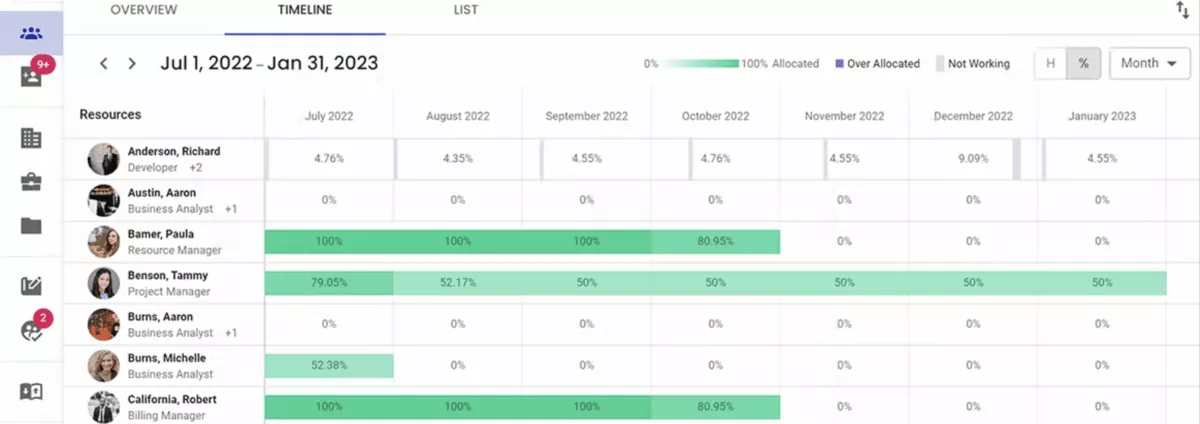
Replicon is a more specialized platform for teams that care more about accurate time capture, approvals, and cost visibility than broad project planning.
It is strongest when missed hours, messy timesheets, or weak labor data are creating billing leakage and making resource utilization harder to trust. If that sounds familiar, our guide to tools teams pick instead of Replicon shows where they usually look next.
Key Features
- AI-powered time tracking and timesheets
- Time and expense tracking with approvals
- Project time and cost management for billable and non-billable work
- Analytics for labor costs, utilization, and profitability
SOurce: replicon
Pros
- Reduces manual time entry and improves accuracy
- Gives clearer visibility into project hours, labor costs, and profitability
- Easy to use for day-to-day time entry and leave workflows
- Useful reporting and configuration for audits and admin work
Cons
- Reporting and template customization are harder than they should be
- Some settings and features take time to learn
- Fixing errors can be messy
- Integration gaps can create extra admin work
Final Verdict
Replicon works best when the biggest problem to solve is bad time data, not broader delivery planning. If your team needs a more complete PSA with stronger project planning, cleaner reporting, and less admin friction, you will probably outgrow it.
7. BigTime – Best for Billing Workflows Tied to Time and Expenses
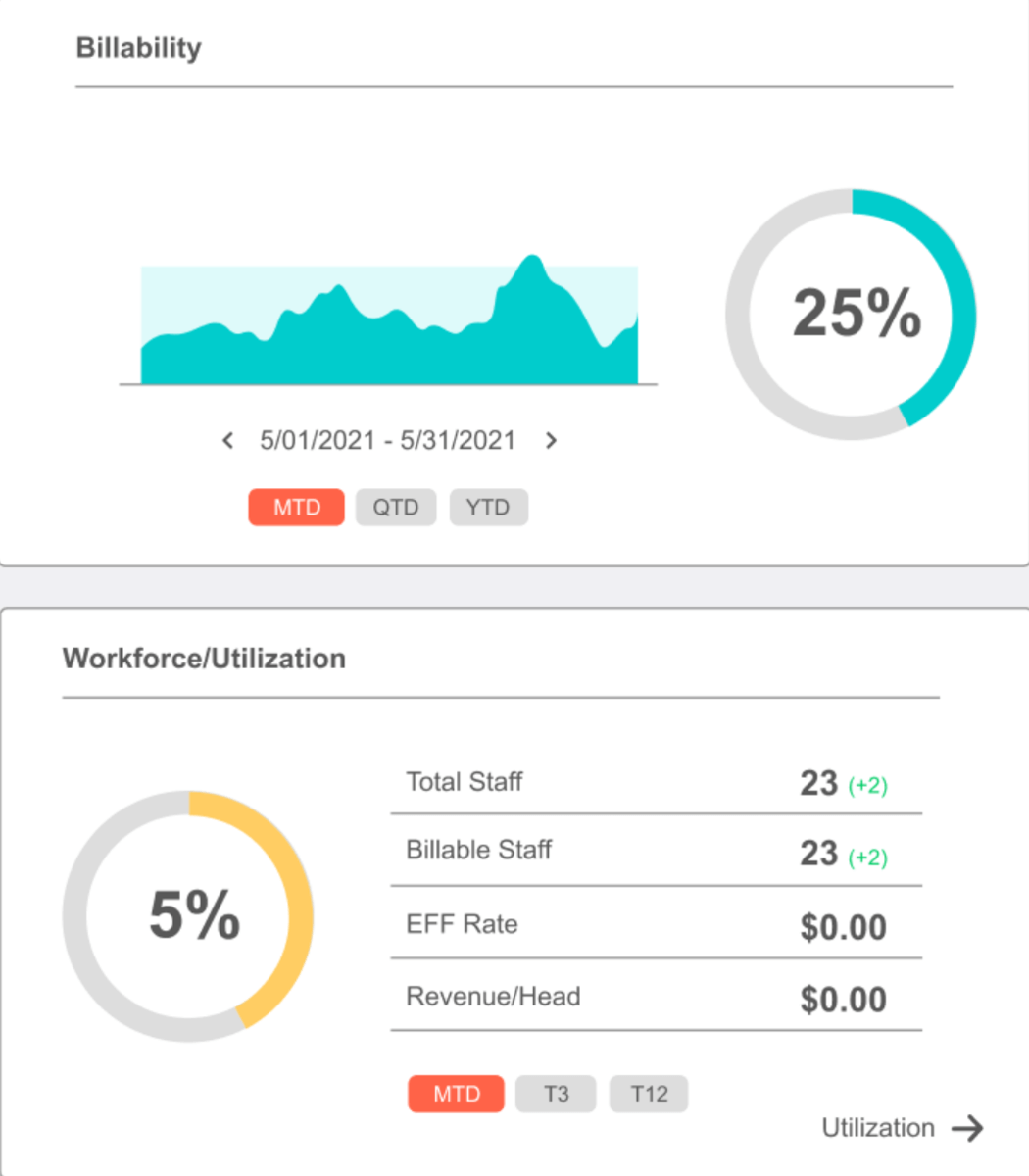
BigTime can make sense if invoicing delays, billing friction, or weak visibility into billable work are slowing down how a service team gets paid. It is a better fit for firms that care most about time tracking, billing, and financial visibility, and less of a fit for teams that need deeper planning across delivery.
Key Features
- Hours and expense capture tied to client work
- Billing and invoicing workflows for professional services
- Budgeting, cost tracking, and financial reporting
- Project planning and team allocation
SOurce: bigtime
Pros
- Easy time entry across daily and weekly workflows
- Strong support for billing, invoicing, and tracking billable work
- Clean dashboards and a generally intuitive interface
- Helpful integrations and reporting for service teams
Cons
- Reporting flexibility can be limited or require manual work
- Editing submitted time can create extra back-and-forth
- Setup and customization can take trial and error
- Bugs and workflow friction can affect billing confidence
Final Verdict
Pick BigTime when the biggest operational problem is getting time and billing under control. If your team needs stronger project planning, more flexible reporting, or less friction after hours are submitted, the gaps will show up fast.
8. Elorus – Best for Smaller Teams That Need Invoicing, Time Tracking, and Project Cost Visibility
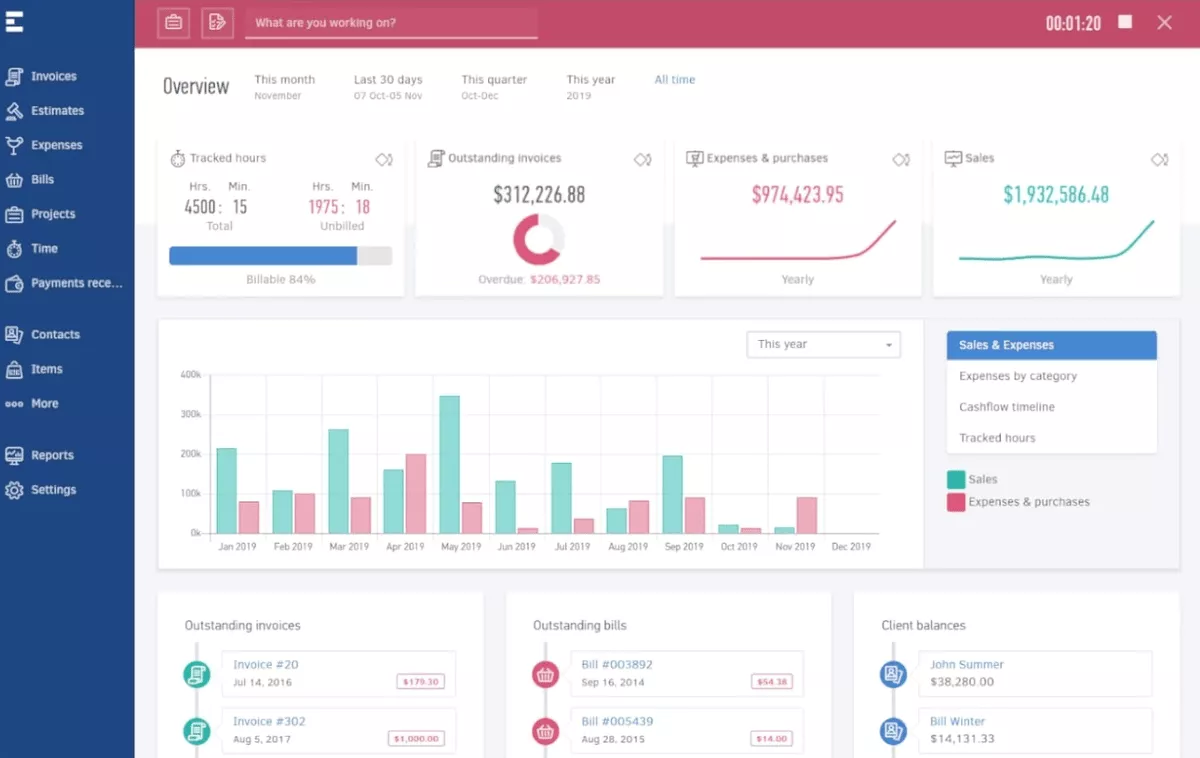
Elorus works best for smaller teams that want to replace spreadsheets, manual invoicing, and scattered cost tracking with something simpler. It is not trying to be a heavy PSA suite, which is exactly why it can make sense for teams that mainly need time tracking, billing, and basic project financial management in one place.
Key Features
- Online invoicing and recurring billing
- Time tracking and project billing
- Expense tracking and project cost analysis
- Client portal and payment collection
SOurce: elorus
Pros
- Very easy to use for invoices, time tracking, and day-to-day admin
- Attractive invoice templates and automated payment reminders
- Good fit for small teams that need one place for billing and project costs
- Includes a forever free plan and affordable entry point
Cons
- Inventory management is limited
- UI customization is basic
- Some integrations and navigation workflows feel rough
- Free plan and pricing limits can show up quickly as needs grow
Final Verdict
Elorus makes sense when the goal is to clean up invoicing, time tracking, and project cost visibility without adding a heavy system. It is not the right choice for teams that need deeper PSA workflows, stronger integrations, or more room to scale before the limits start to show.
9. Birdview PSA – Best for Visual Resource Planning and Workload Balancing
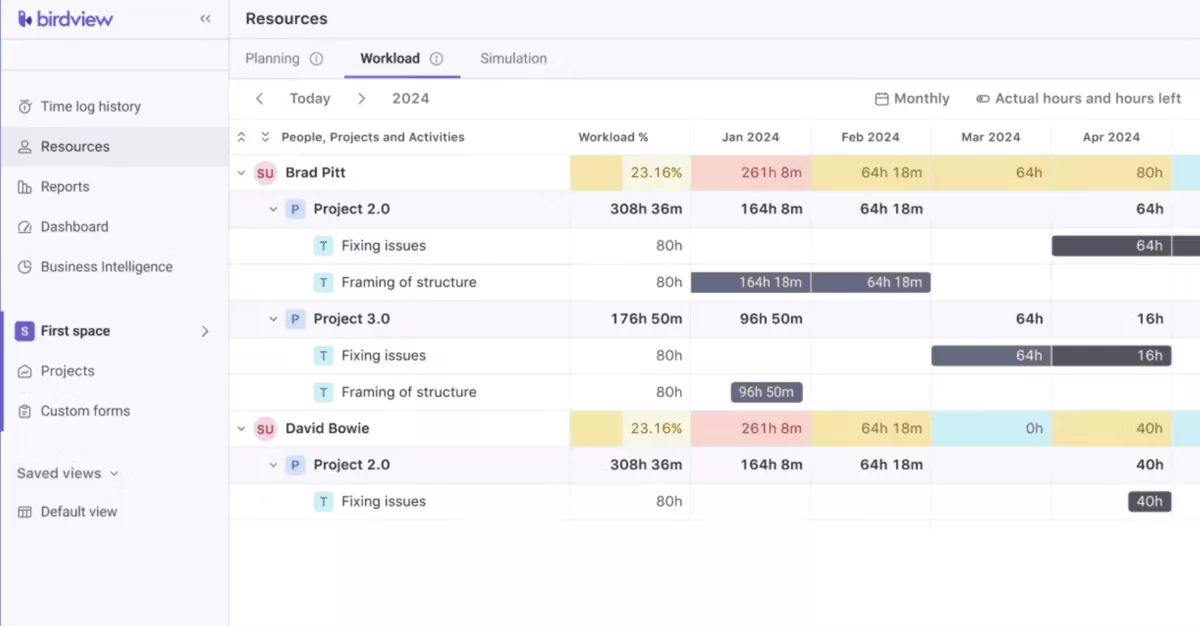
Birdview works best for teams that need a clearer view of projects, time, and team workload without overcomplicating day-to-day use.
It is a better fit when the main problem is keeping active delivery work visible and organized, but it is less compelling for teams that need tighter admin control or deeper built-in reporting.
Key Features
- Capacity planning, workload visibility, and resource allocation
- Time tracking and timesheets
- Project budgeting and financial dashboards
- Multiple project views, including Gantt, board, and calendar
SOurce: birdview psa
Pros
- Easy to use for managing projects with multiple users
- Clean interface for tracking and billing time
- Keeps project work in one place and improves visibility
- Flexible hour tracking across projects and sub-projects
Cons
- Charging time across multiple days could be simpler
- Project and task search can feel cluttered
- Admin permissions around Spaces can create support issues
- Built-in reporting may not be deep enough without extra tools
Final Verdict
Birdview is a solid fit when your team mainly needs better visibility into projects, time, and workload across active work. It is not the best pick if you want admin control, smoother time-entry workflows, or stronger built-in reporting.
10. Accelo – Best for Connecting Client Work, Delivery, and Billing
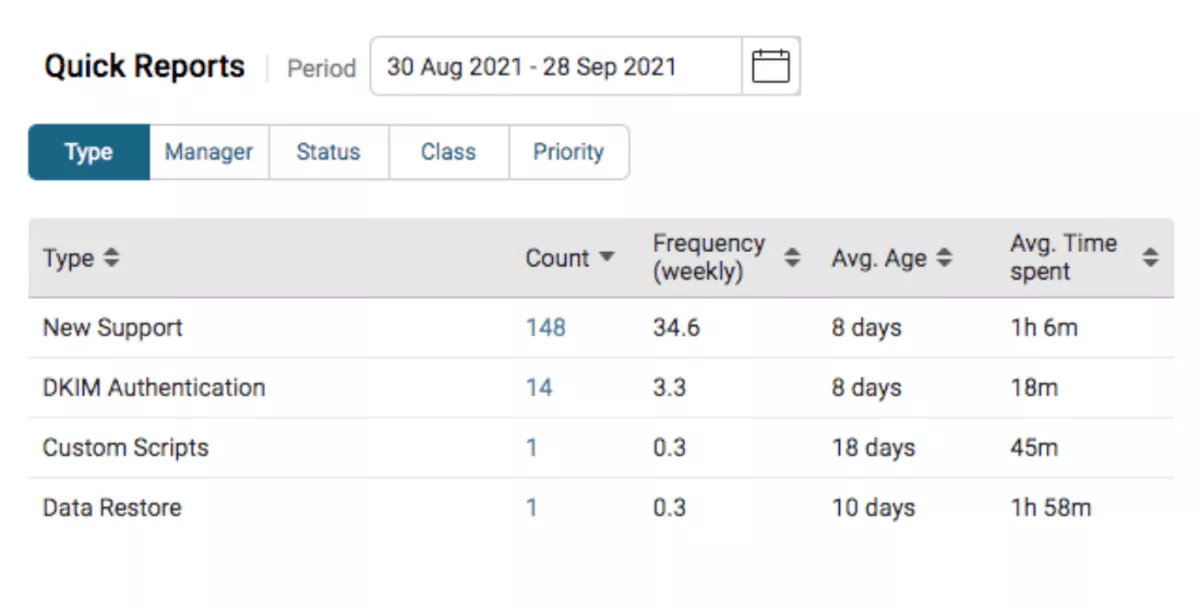
Accelo works best for service businesses that want client records, projects, time tracking, and billing to stay connected instead of being split across separate systems.
It is a stronger fit when the operational problem is handoff friction between account management, delivery, and invoicing, but it asks teams to accept more setup complexity than lighter tools do.
If you are comparing that model with other service-ops options, our guide to alternatives teams consider instead of Accelo is a good follow-up read.
Key Features
- Client, sales, and project workflows in one system
- Time tracking tied to tasks, projects, and client work
- Billing and invoicing connected to delivery activity
- Customizable triggers, templates, and shared lists
SOurce: accelo
Pros
- Keeps CRM, projects, billing, and task tracking connected
- Flexible enough to support different team workflows
- Useful integrations, including accounting connections like Xero
- Strong visibility into client history, work, and internal communication
Cons
- Setup and configuration can take a long time
- Some triggers and automations are hard to test safely
- Interface and reporting need more investment
- Mobile and some email workflows still feel undercooked
Final Verdict
Accelo is a good fit when the biggest issue is broken handoffs between client work, delivery, and billing. It is a weaker option for teams that want fast setup, simpler admin, or a system that feels polished in every part of the product.
11. BQE CORE – Best for Accounting-Driven Project and Profitability Tracking
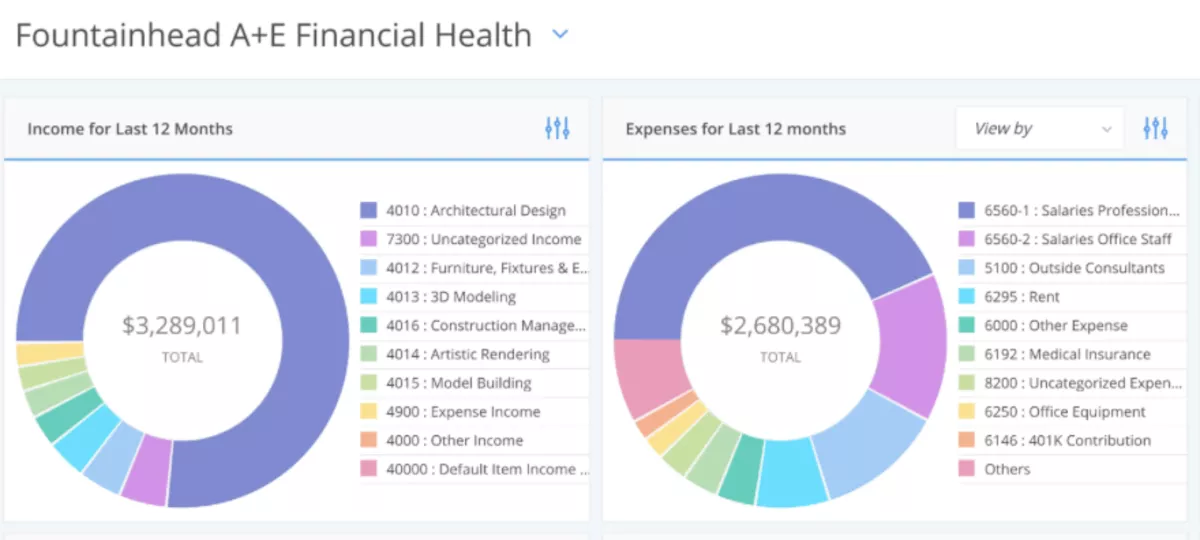
BQE CORE is a stronger fit for firms that want project accounting, billing, time tracking, and reporting to live in the same system instead of being reconciled after the fact.
It makes more sense when margin visibility and billing control matter as much as project delivery, but the tradeoff is that usability and speed can feel uneven.
Key Features
- Project accounting, billing, and invoicing
- Time and expense tracking by project phase
- Budgeting, dashboards, and detailed reporting
- Project management for tasks, phases, and client work
SOurce: bigtime
Pros
- Strong time entry and phase-based tracking for project work
- Helpful billing and invoicing tools tied to project data
- Detailed reporting supports budget and progress visibility
- Support is responsive and helps teams get more out of the system
Cons
- Performance can feel slow when pages or mobile screens load
- New users may find navigation and training harder than expected
- Some common actions, like deleting time entries, are clunky
- The product can feel reliable overall, but not especially polished
Final Verdict
BQE CORE is a good fit when your team wants accounting depth, better billing control, and clearer project margins in one place. It is a weaker fit if clean UX, faster performance, and lighter day-to-day workflows matter just as much as financial control.
How to Choose the Best PSA Platform for Your Business? (Step-by-Step Process)
You should choose the best PSA platform for your business by mapping the workflows you need to run, testing them in a shortlist, and checking whether the system supports billing, staffing, reporting, and delivery without extra workarounds.
A practical buying process makes bad-fit tools easier to eliminate early. It also helps to know what good delivery operations should look like before you start scoring tools, which is where our guide to professional services project management can help.
Step 1: Map the Workflows That Break Most Often
Start with the workflows that are already costing the team time or money. That usually means capacity planning, time capture, billing, approvals, or reporting. Write down where the process starts, who touches it, which tool they use, what gets copied manually, and where the process stalls.
Then turn that into a shortlist of five to seven buying requirements. A useful list usually sounds like this: can assign work by role or person, can approve time before invoicing, can track budget burn by project, can show billed versus unbilled work, and can report on utilization without exporting data.
Step 2: Build a Shortlist Around Your Real Use Case
Use category pages, review sites, and vendor pages to collect an initial long-list, then cut it down with hard filters.
Remove any tool that is missing one of your non-negotionables, depends on an ecosystem you do not use, or is clearly built for a much larger or much smaller operation than yours.
A simple way to do this is to score each tool from one to five across four areas: delivery workflows, project management, staffing, financial control, and reporting.
If a tool scores low in one of the areas that matters most to your team, it should not stay on the shortlist just because it is popular.
Step 3: Test the Workflows That Matter Most
Run a trial or demo using one real project, not a fake setup. Ask the vendor to show how the tool handles assigning work, entering time, approving time or expenses, updating a budget, and generating one client-facing invoice or one internal profitability report.
The goal here is to watch the workflow, not the feature tour. If the vendor needs workarounds, exports, or too much manual setup to answer basic questions, that is a buying signal, not a small inconvenience.
Step 4: Validate Reporting, Billing, and Financial Visibility
Before you move forward, ask the same five questions in every tool:
- Who is over capacity?
- Which projects are over budget?
- What has not been billed yet?
- Where margins are slipping?
- Which work is still waiting for approval?
If the system cannot answer those questions cleanly, the reporting and analytics are not good enough. This is also where review patterns matter.
A tool may show strong dashboards in a demo and still create reporting pain in real use. If multiple reviewers complain about reporting, billing friction, or weak financial visibility, treat that as product feedback, not edge-case noise.
Step 5: Involve the Teams That Will Actually Use It
Bring delivery, finance, and operations into the test before the shortlist becomes a final decision. Ask each team one simple question: what would make this tool fail in the first 90 days?
That usually surfaces the real risks faster than a generic feedback round. Finance will spot billing or reporting gaps, delivery will spot workflow friction, and admins will spot setup problems.
If two teams raise the same issue, treat it as a dealbreaker until proven otherwise.
What Are the Key Factors to Take Into Account When Choosing PSA Software?
The key factors to take into account when choosing PSA software are: workflow fit, staffing visibility, financial control, reporting quality, implementation effort, and how much manual work the system removes.
These factors matter because a PSA tool usually fails in the details, not in the demo.
The best way to evaluate them is to look at how each one affects day-to-day delivery.
- Workflow fit: The tool should match how your team actually runs projects, not force work into a structure that only looks good in a sales demo.
- Capacity visibility: You should be able to see workload, capacity, and staffing gaps before they turn into missed deadlines or budget overruns.
- Financial control: A good PSA tool should make it easier to track budgets, billable work, approvals, invoicing, and margins without rebuilding the numbers in spreadsheets. If billing is one of the pain points driving the search, our guide to professional services billing workflows is a useful companion read.
- Reporting quality: The system should answer basic operational questions quickly, especially around utilization, project health, budget burn, and unbilled work.
- Implementation effort: Some tools are powerful but take too long to configure, train, and maintain. That matters because setup cost is part of the buying decision.
- Admin load: If common actions still need workarounds, exports, or too many clicks, the tool will create more process overhead than it removes.
How to Migrate to a PSA Platform? (+ Checklist)
You should migrate to a PSA platform by cleaning up your data first, deciding which workflows matter on day one, and rolling the new system out in phases instead of trying to replace everything at once.
A safer migration keeps the team focused on continuity, not on copying old problems into new PSA platform.
A simple rollout plan makes the switch easier to manage and easier to recover if something breaks.
Bonus PSA Migration Checklist
- Define what must be live on day one, such as active projects, open budgets, time tracking, billing workflows, and key reports.
- Clean up your source data before migration. Archive dead projects, fix broken client records, and remove duplicate task, budget, or contact data.
- Map your current workflows to the new tool. Do not just import data. Decide how projects, time entries, approvals, invoices, and reporting should work in the new setup.
- Choose a migration owner and a small rollout team with finance, delivery, and admin representation.
- Migrate one live pilot project first to test time entry, staffing, billing, approvals, and reporting under real conditions.
- Document the exact issues that show up during the pilot, then fix them before rolling the tool out more widely.
- Train each team on the workflows they actually use, not on every feature in the product.
- Set a clear cutover date for the old system and communicate what will stop, what will move, and where the new source of truth will live.
- Track the first two to four weeks closely, especially around missing time, invoice delays, broken permissions, and reporting gaps.
- Review the migration after rollout and clean up anything the pilot missed before the new process becomes permanent.
Closing Thoughts – What’s the Best Choice for Your Team?
The best PSA platform is the one that centralizes delivery, staffing, project work, and financial visibility in the same system without adding new friction. That usually matters more than whether the product looks polished in a demo or checks every possible feature box.
Stitching different tools on different plans often complicates operations, workflows and data. And yes, the money you save on subscriptions gets spent on non-billable hours configuring the data, or as bad decisions.
The unpopular truth is that an all-in-one option (like Productive) makes more sense because projects, budgets, time, and planning stay connected instead of being managed across separate systems.
The best, smartest and cheapest way to start is to book a short demo, and prep your migration questions and concerns.
Connect With Agency Peers
Access agency-related Slack channels, exchange business insights, and join in on members-only live sessions.
