Top 10 ERP for Professional Services (2026) + How to Choose

Enterprise resource planning (ERP) software for professional services firms comes in two kinds. One kind of ERP system owns your books and closes your month. The other runs projects well, then hands its numbers to an accounting system.
This guide covers the best ERP for professional services across both kinds, ten tools in all. Each one gets four key features, pros and cons from real user reviews, and a clear skip signal.
We compare every ERP system in one table, then cover how to choose and roll out ERP software.
What Are the Best ERPs for Professional Services in 2026?
The best ERPs for professional services in 2026 are Productive, NetSuite, Microsoft Dynamics 365 Project Operations, and Sage Intacct. The rest are Deltek Vantagepoint, Certinia, Unit4 ERPx, SAP Cloud ERP (formerly SAP S/4HANA Cloud), Unanet GovCon, and Odoo.
How These ERPs Compare?
Every cloud based ERP software for professional services here covers time and expense tracking. Data security and standard security features are a given, so neither decides anything.
| Tool | Category | Resourcing | Sales to Project | Who Should Skip |
|---|---|---|---|---|
| Productive | All-in-one platform | Built in | Built in | Must close books in one system |
| NetSuite | Full ERP | Separate app, SuiteProjects Pro | Built in | One entity, one billing model |
| Microsoft Dynamics 365 Project Operations | Project ERP | Built in | Built in, Dynamics 365 Sales | Not on the Microsoft stack |
| Sage Intacct | Finance-first ERP | Thin, expect a second tool | Not included | Main gap is staffing |
| Deltek Vantagepoint | Project ERP | Built in | Built in, pursuit tracking | Work does not arrive by proposal |
| Certinia | Project ERP | Built in | Built in, Salesforce | Not already paying for Salesforce |
| Unit4 ERPx | Full ERP | Built in | Not included | Need North American partners |
| SAP Cloud ERP | Full ERP | Built in | Seperate module | Keeping your own process |
| Unanet GovCon | Project ERP | Built in | Separate product, Unanet CRM | No federal contracts |
| Odoo | Full ERP | Needs configuring | Built in, CRM module | No developer capacity |
How We Chose These Tools?
We chose these tools on vendor documentation, user reviews, whether they carry a ledger, and buyer fit. Each one is a requirement.
- What the vendor documents. Every feature claim traces to the vendor’s own product pages.
- What real users say. Pros and cons come from individual reviews written by named people, not theme counts.
- Whether it carries a general ledger. That is the record finance closes the month on. An ERP system for professional services has one, so project accounting and the books are the same records. Tools without one feed your accounting software, so we label those all-in-one platforms, not ERP software.
- Who it fits. We name the firm each tool suits and the firm that should walk away. That matters more in the service industry than in project-based work.
1. Productive – Best ERP for Agencies, Consultancies, and Professional Services
Productive is an all-in-one platform for agencies, consultancies and other professional services firms. It runs sales, project management, resource allocation, time tracking and billing on one set of records.
Try Productive for your ERP
Your Plan and Your Logged Hours Meet on the Same Budget
You plan people in a spreadsheet and track hours in another tool. Then you spend the end of every month lining the two up, usually by hand.
Productive keeps both against the same budget. Bookings made in Productive’s resource planning appear beside the hours your team has logged. Approved time off and real capacity are already accounted for.
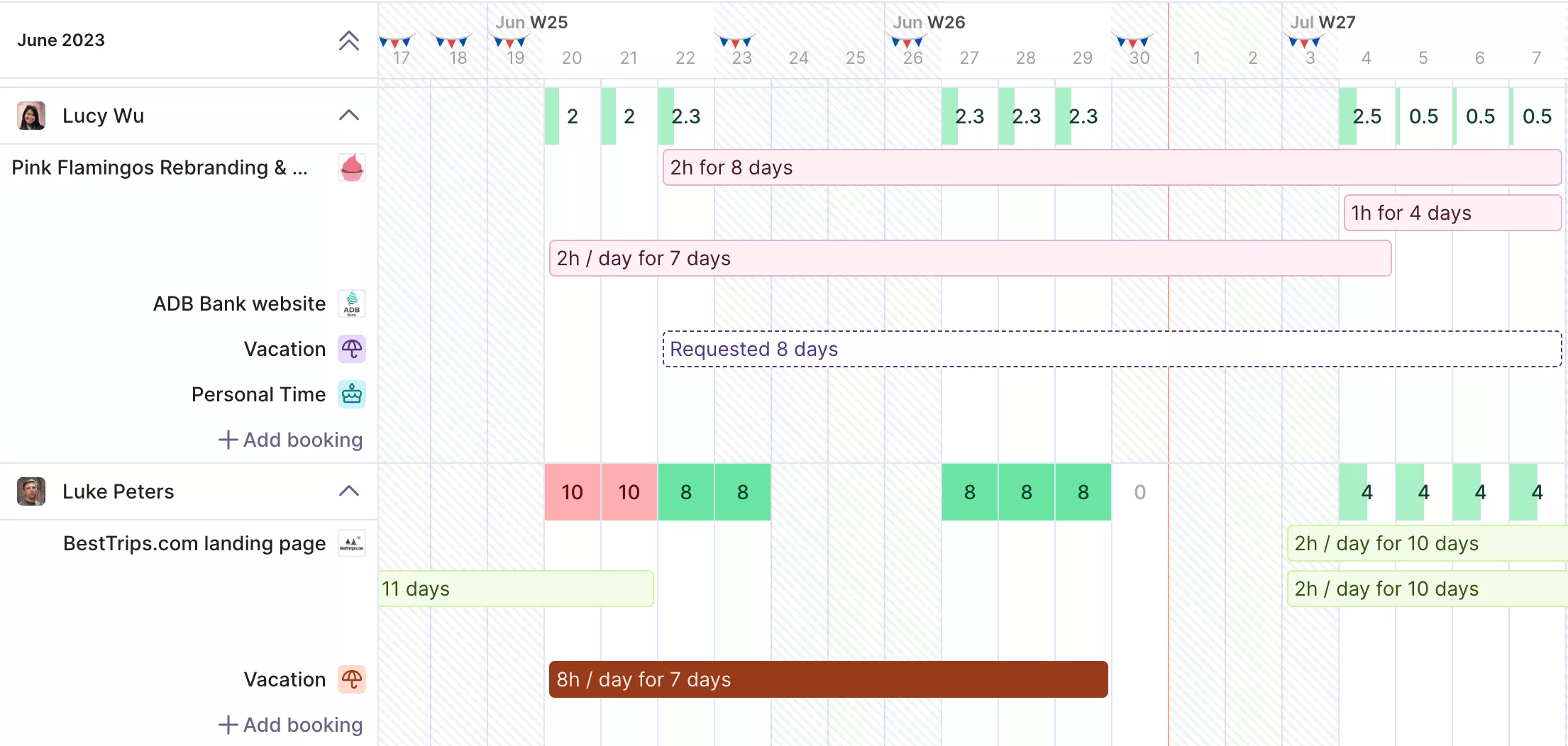
You can see a project drifting off its project timelines while you can still move people.
You Know the Project Margin Before the Month Closes
Ask for a project margin halfway through a month and someone usually rebuilds it by hand. Worse, that someone is normally the one person who knows where all the numbers live.
Productive works out budget spend and profit as time and expenses are logged, so the figure is already waiting.
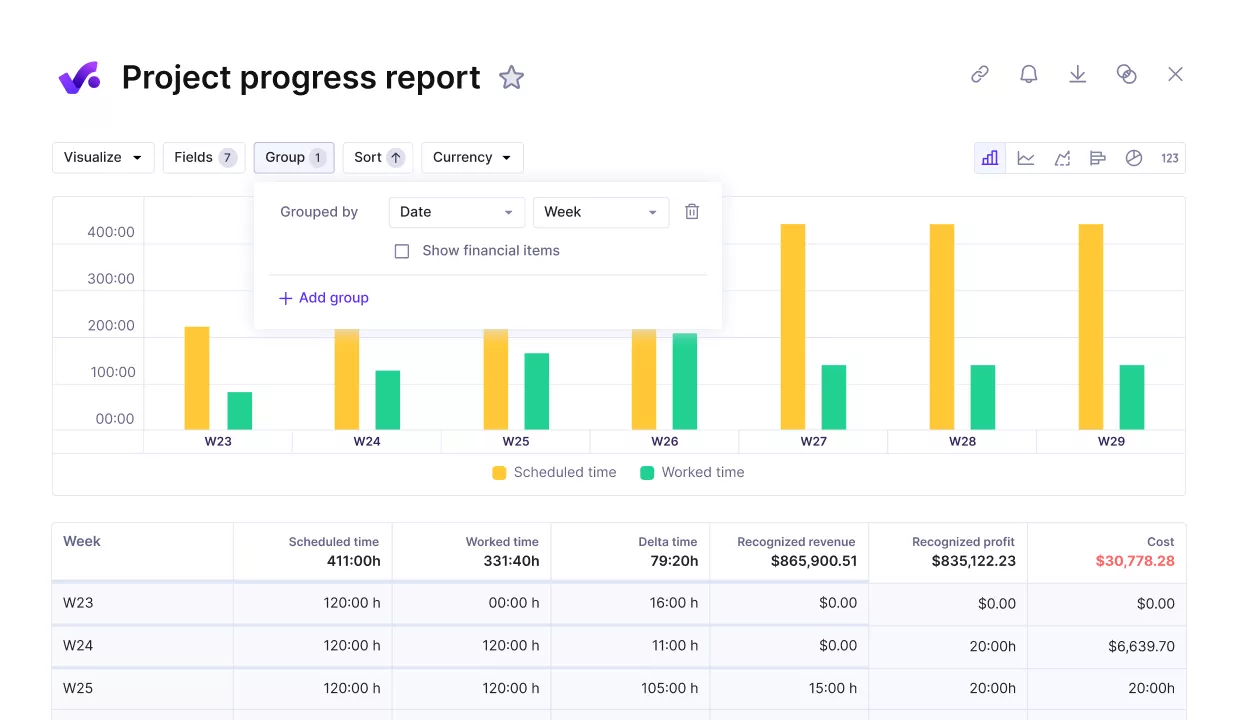
Real-time reporting covers billable utilization, project profitability and budget usage by client, with templates written for professional services questions.
Client management data feeds the same reports, so budgeting and profitability never wait on a month-end close.
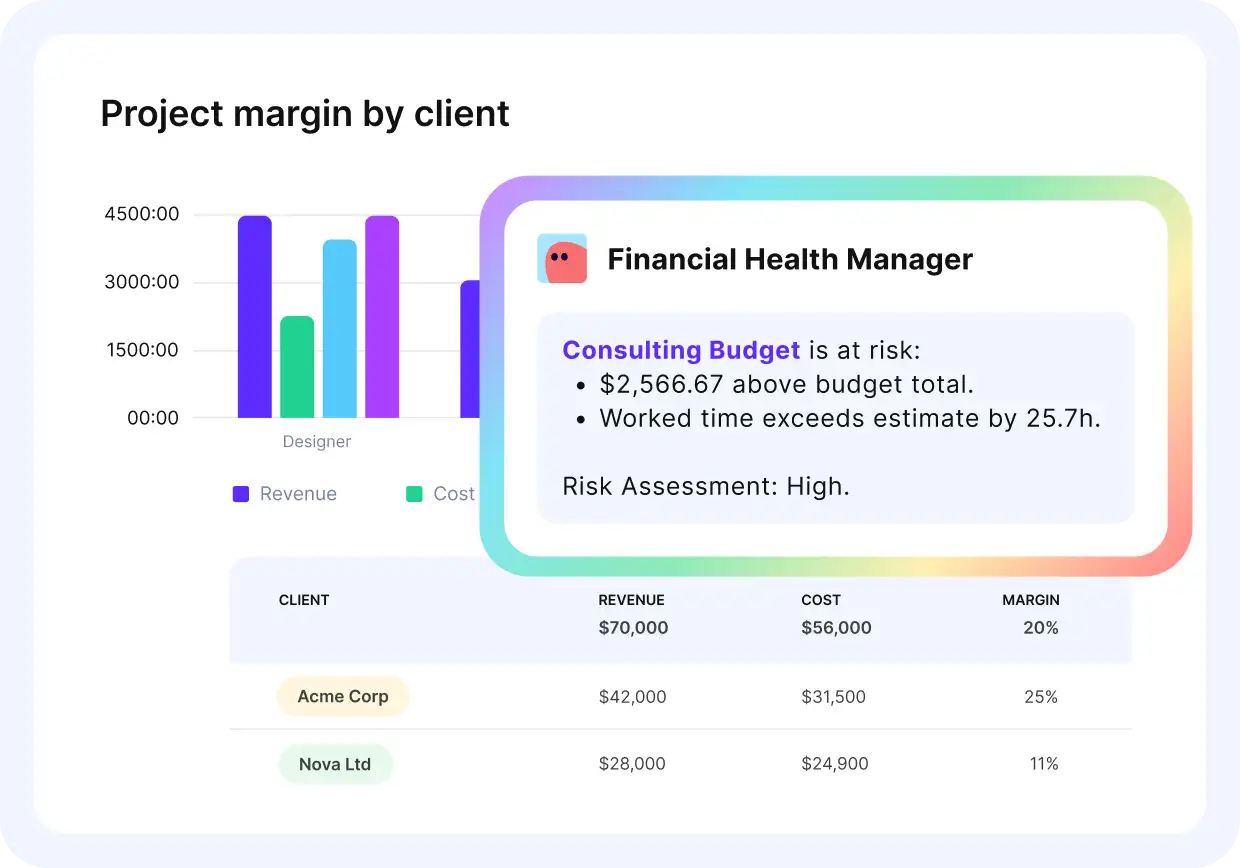
Ask the AI assistant in plain language how profitable your projects are, and get instant answers.
Revenue Lands in the Month the Work Was Delivered
Fixed-fee and retainer work bills on one schedule and gets delivered on another. Your billable hours and your recognized revenue drift apart, and nobody notices until the quarter is closed.
Quote-to-cash, the path from a signed proposal to a paid invoice, ends up split across three systems.
Recognizing revenue in Productive follows the billing type you set on each service. Approved time, bookings and billable expenses all feed that calculation, and invoice generation pulls from the same records.
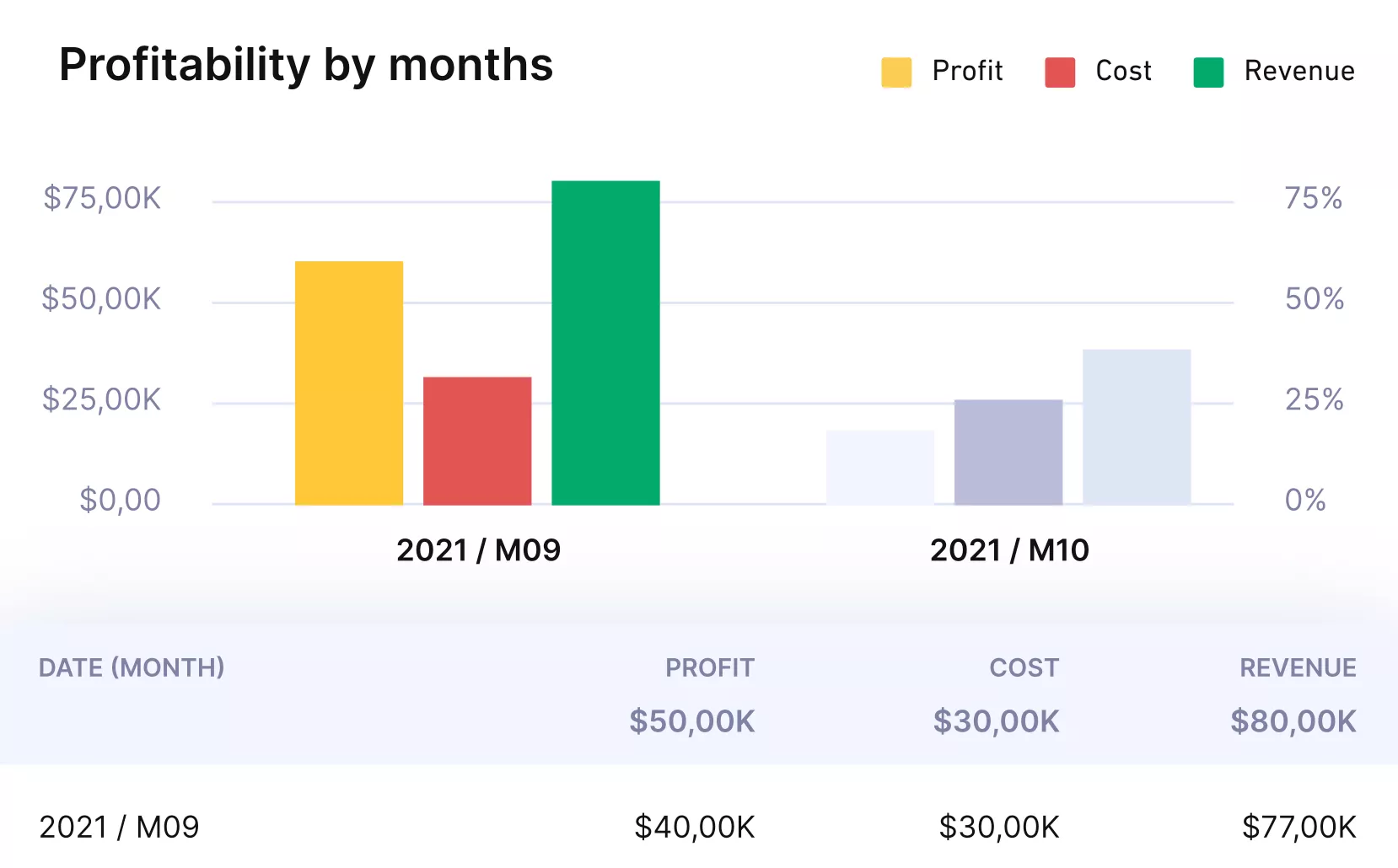
Get instant profitability updates and reports.
Multi-currency budgets cover clients billed abroad, and the invoicing system syncs with Xero, QuickBooks and Exact.
Pricing
- Plans start with the Essential plan at $10 per user per month, which includes essential features such as budgeting, project & task management, docs, time tracking, expense management, reporting, and time off management.
- The Professional plan includes custom fields, recurring budgets, advanced reports, billable time approvals, and much more for $25 per user per month.
- The Ultimate plan has everything that the Essential plan and Professional plan offer, along with the HubSpot integration, advanced forecasting, advanced custom fields, overhead calculations, and more. Book a demo or reach out to our team for the monthly price per user.
You can also try out Productive with a 14-day free trial.
Know Whether You Can Staff the Work Before You Win It
Bookings in Productive’s Resource Planner show real availability and time off, and forecast utilization months ahead.

2. NetSuite – Best for Mid-Market Firms Consolidating Multiple Entities
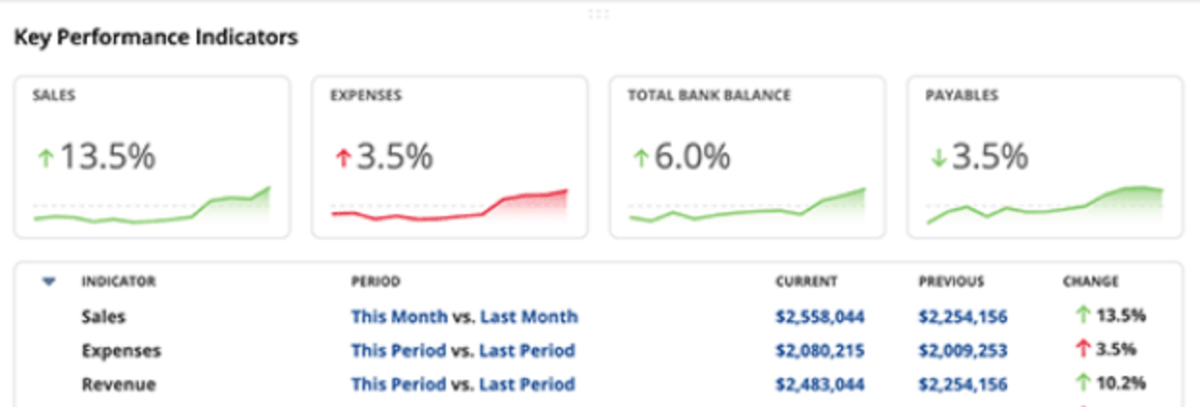
NetSuite is a cloud ERP system that runs financials, projects and billing on one database. Accounting for projects posts to the ledger finance closes, so time tracking and expense tracking reach the books directly.
Key Features
- Job costing with time and expense management
- SuiteProjects Pro for resource allocation and utilization
- Milestone, time-and-materials and fixed-fee billing
- Multi-subsidiary consolidation across currencies
SOurce: netsuite
Pros
- Accounting, billing and reporting run on one record. Finance stops reconciling between systems each month.
- Global teams see the same data at once. Transactions appear in real time, with no wait for processing.
- The report range answers most finance questions. Coverage stretches across business, tax, payroll and benefits.
Cons
- The base licence covers less than buyers expect. Essential capability arrives as paid modules, which sends some buyers to alternatives to NetSuite.
- Customizing usually means paying a consultant. Specific changes need custom scripts in-house teams cannot write.
- Project profitability is slow to recalculate. Background processing is opaque, so margin figures are hard to trust.
Who Should Skip NetSuite?
NetSuite is the wrong ERP system for professional services firms running one legal entity and one billing model. You configure consolidation across entities you will never run, and the rollout eats months of project management time.
3. Microsoft Dynamics 365 Project Operations – Best for Firms Already Running Microsoft 365
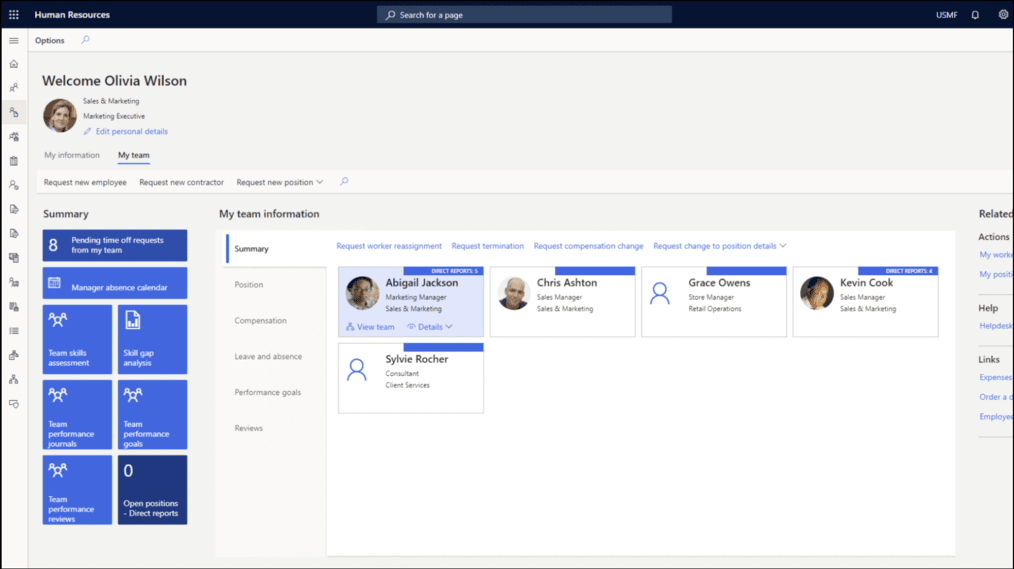
Microsoft Dynamics 365 Project Operations joins sales, resourcing, project delivery and project finance in one application. The core version extends Dynamics 365 Sales, and full project costing needs Dynamics 365 Finance underneath it.
Key Features
- Quote to project handoff from Dynamics 365 Sales
- Skills-based resource scheduling across the project lifecycle
- Time tracking and expense capture inside Teams
- Project timelines with Gantt charts and automated workflows
SOurce: Microsoft Dynamics 365 Project Operations
Pros
- Sales, service, finance and operations share one ecosystem. Moving from a deal to invoicing to reporting keeps its context.
- Reporting depth holds up under real questions. Workflows stay flexible and customization covers both CRM and ERP needs.
- Multi-country and multi-language work is handled natively. International teams run on one platform, not a patchwork per region.
Cons
- Setup normally needs a certified partner. Initial configuration needs technical expertise most firms lack in house.
- The interface makes you wait. Every form is a page load, and settings split across three separate admin centers.
- Small teams find it more product than they need. Capability outruns what a small delivery team will configure.
Who Should Skip Microsoft Dynamics 365 Project Operations?
Microsoft Dynamics 365 Project Operations is the wrong ERP system for a firm not already on Microsoft 365. You license two applications to get one project management workflow, and the integration advantage never arrives.
4. Sage Intacct – Best for Finance-Led Firms Reporting Profit by Client
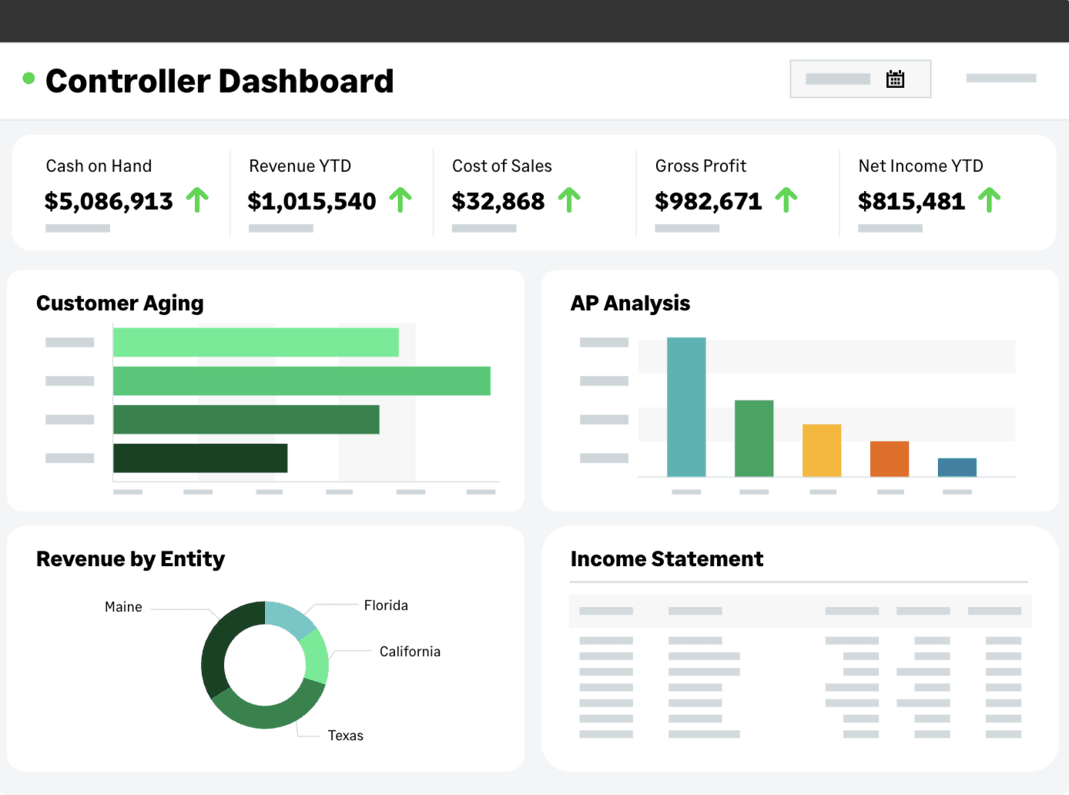
Sage Intacct is a cloud financial management platform built on a dimensional ledger. You tag a transaction with client, project and entity, then report on any of them without building new accounts.
Key Features
- Dimensional project accounting across client and entity
- Contract billing with automated revenue schedules
- Time and expense feeding billing and the books
- Consolidation across entities with currency conversion
SOurce: Sage Intacct
Pros
- Financial reporting slices by client without new accounts. Dimensions let finance cut project profitability by client, department or entity on demand.
- High-volume contract billing closes faster. Invoicing over a thousand contract lines takes hours rather than days at month end.
- Consolidation across subsidiaries is automatic. Intercompany transactions and currency conversion run without the manual close work they usually take.
Cons
- Routine record creation is slow. Setting up vendors and customers runs through long procedures that eat time every week.
- The audit trail does not show who changed what. Finding what was posted or amended, and by whom, is harder than it should be.
- The system rewards doing things its way. Careless setup or testing leaves erroneous data and formatting that is difficult to undo later.
Who Should Skip Sage Intacct?
Sage Intacct is the wrong ERP system for a firm whose real gap is staffing rather than accounting. Resource management stays outside the platform, so you integrate a second tool to fix what you bought this for.
5. Deltek Vantagepoint – Best for Architecture and Engineering Firms Winning Work by Proposal
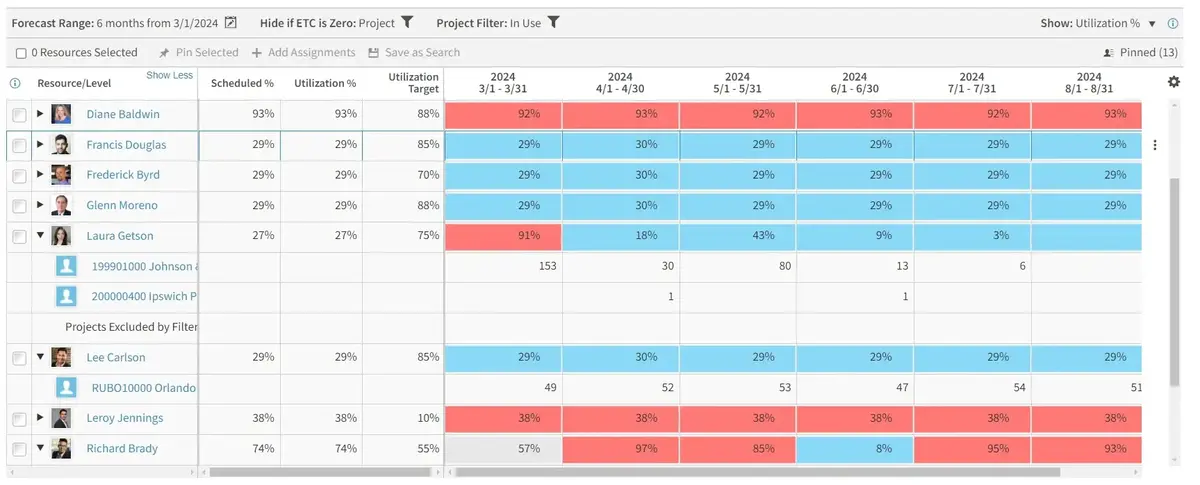
Deltek Vantagepoint is project ERP built for architecture, engineering and consulting firms. It runs an engagement from pursuit through closeout, so the proposal and the project are one record.
Key Features
- Pursuit and proposal tracking across the project lifecycle
- Dashboards carrying Deltek Clarity industry benchmarks
- Resource planning with skills-based search and Gantt scheduling
- Job costing with earned value and milestone billing
SOurce: Deltek Vantagepoint
Pros
- Resource views show when you need to hire. Workload insight across the team flags the point where the next hire becomes necessary.
- Project structures match how engineering work is shaped. Time lands in the right breakdown structure on projects that run few phases and many milestones.
- Entering data once feeds every module. Hours captured for a timesheet carry through to client management, invoicing and payroll without rekeying.
Cons
- Reporting runs into its limits quickly. Getting a clean data set out often means merging several reports by hand.
- Implementation help is thin on the ground. Firms report implementors without deep system knowledge and change requests waiting months.
- Approval chains are long and error-prone. Payables, expense reporting and timekeeping all pass through a process with room for mistakes.
Who Should Skip Deltek Vantagepoint?
Deltek Vantagepoint is wrong for professional services firms whose work does not arrive by proposal. Its project controls model a pursuit process you do not run, so you configure around assumptions that never applied.
6. Certinia – Best for Firms That Already Run Salesforce
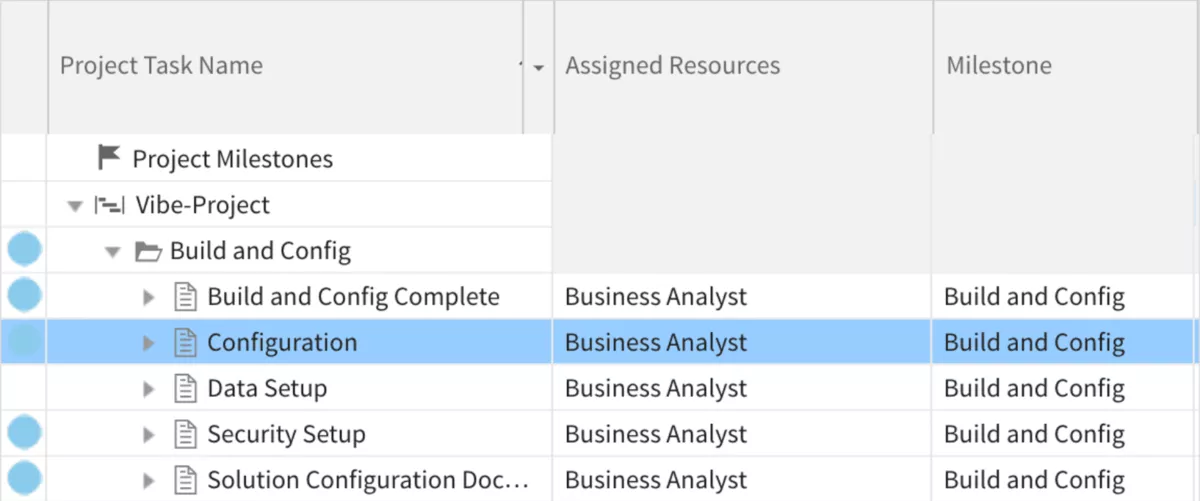
Certinia is professional services automation built natively on the Salesforce platform. Your opportunity, project, staffing and invoice are records alongside your customer relationship management data, so nothing gets handed across.
Key Features
- Opportunity to project handoff on shared customer data
- Resource allocation with skills matching and capacity planning
- Milestone-based billing on client management records
- Client engagement tracking through project delivery
SOurce: certinia
Pros
- A won deal builds its own project. Opportunity data drives the resourcing plan and creates the project without a manual handover.
- Staffing matches skills to the work in front of you. Resource management surfaces who is overbooked and who is idle before either becomes a problem.
- Project status stays current across concurrent work. Dashboards make weekly tracking consistent when several engagements run at once.
Cons
- Implementation stalls where other systems meet it. Setup teams often skip the questions needed to understand the data models in your other applications.
- The interface trails the rest of the platform. Building automations has no easy path either, which pushes small changes back to an administrator.
- Billing runs slow down at volume. Firms processing more than a thousand billing events at month end report the generation process hanging.
Who Should Skip Certinia?
Certinia is wrong for professional services firms that do not already pay for Salesforce. It needs that subscription underneath, so you buy a platform before you buy the ERP system.
7. Unit4 ERPx – Best for Services Organizations in Education and the Public Sector
Unit4 ERPx, formerly Unit4 Business World, is a cloud ERP system built for services organizations rather than manufacturers. Finance, HR and project work run on one structure, so reorganising is configuration rather than reimplementation.
Key Features
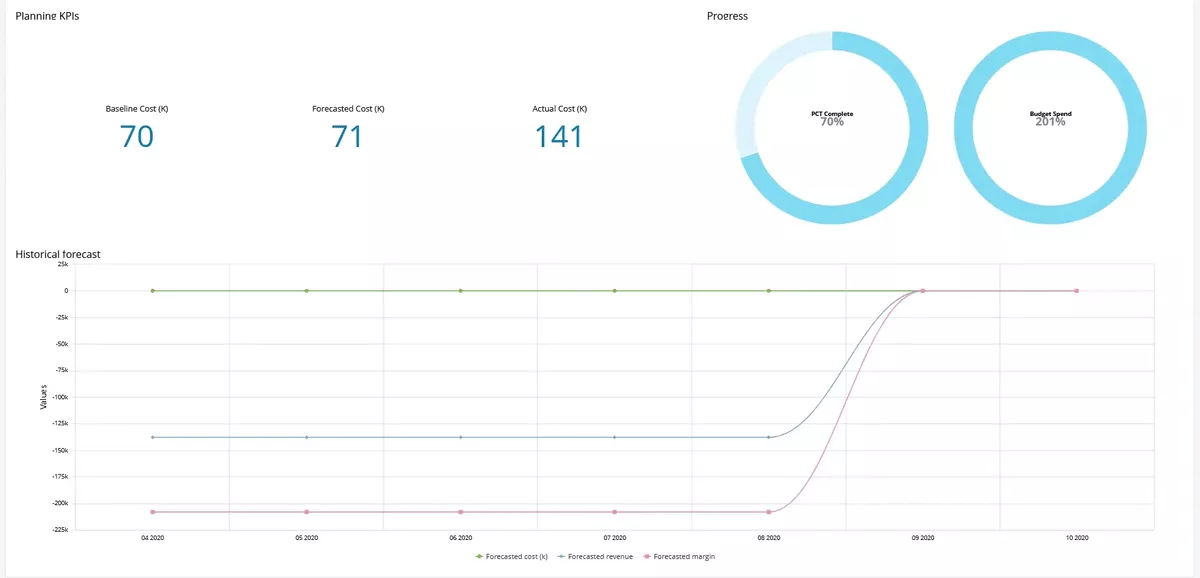
- Resource management with utilization across matrixed teams
- Resource planning tied to time and expense capture
- Financial reporting with commitment accounting
- Grant and fund handling for regulatory compliance
SOurce: Unit4 ERPx
Pros
- Project-level financial management needs no custom report. Budget against actuals is visible where the work happens.
- Timesheets roll straight into project costing. Margins surface early enough to act on, rather than at month end.
- Commitment accounting flags spend before it lands. Committed funds show against the budget, which stops overspending in advance.
Cons
- Fewer integrations than the larger suites. Third-party add-ons for adjacent tasks are thinner on the ground than with competitors.
- Simple tasks take more steps than expected. Routine processes route through several screens, which slows daily work.
- Complexity grows as you add modules. Each new area lengthens the learning curve and the change management effort.
Who Should Skip Unit4 ERPx?
Unit4 ERPx is wrong for professional services firms in North America that want deep local partner support. Its ecosystem is thinner outside Europe, so ERP consulting help is harder to source when something breaks.
8. SAP Cloud ERP – Best for International Firms Consolidating Across Countries
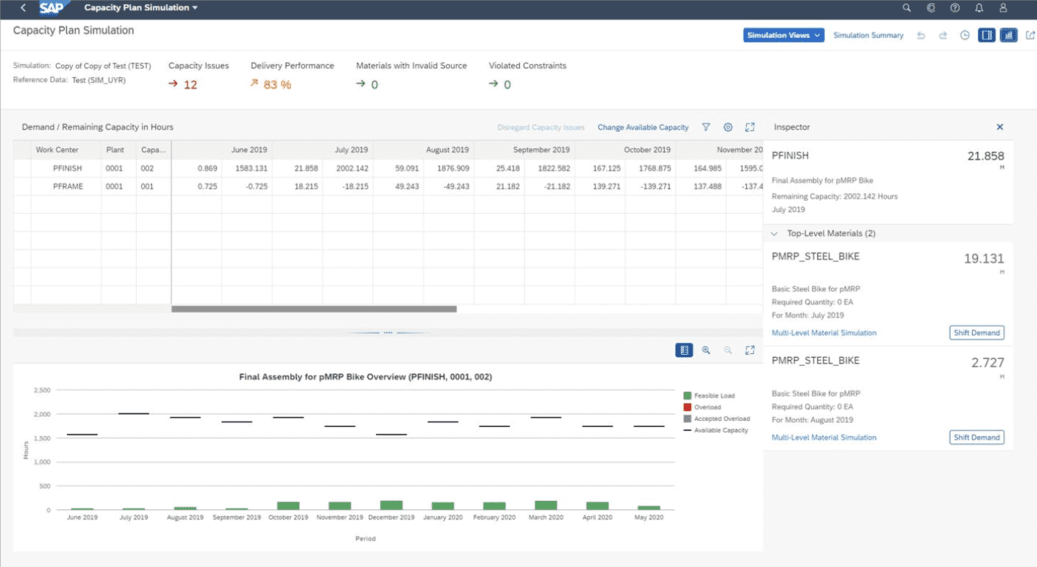
SAP Cloud ERP, formerly SAP S/4HANA Cloud Public Edition, arrives with professional services business processes already configured. Customer projects, resource-related billing and recognized revenue run on preconfigured scope items rather than a build.
Key Features
- Customer projects with staffing and margin on one object
- Resource-related and fixed-price billing across entities
- Multi-currency consolidation with intercompany handling
- Financial management analytics tools with real-time visibility
SOurce: SAP CLoud erp
Pros
- In-memory processing keeps large data sets quick. Analysis runs at speed even when the transaction volume is high.
- Financial reporting updates as transactions post. Reconciliation work gets easier because the numbers are current rather than nightly.
- One platform spans finance, procurement and analytics. A project portfolio reports from the same records the finance team closes on.
Cons
- Heavy standardization forces workarounds. Even simple changes often cannot be made in the way your process expects.
- Training demands are high because everything connects. Users need real instruction before they understand how one entry affects another.
- Non-SAP cloud applications are awkward to connect. Compatibility with tools outside the SAP estate takes more work than expected.
Who Should Skip SAP Cloud ERP?
SAP Cloud ERP is the wrong ERP system for a firm whose delivery process is a competitive advantage. The public edition expects you to adopt its standard, so you change how you work to match the software.
9. Unanet GovCon – Best for Consultancies Delivering Work Under Federal Contracts
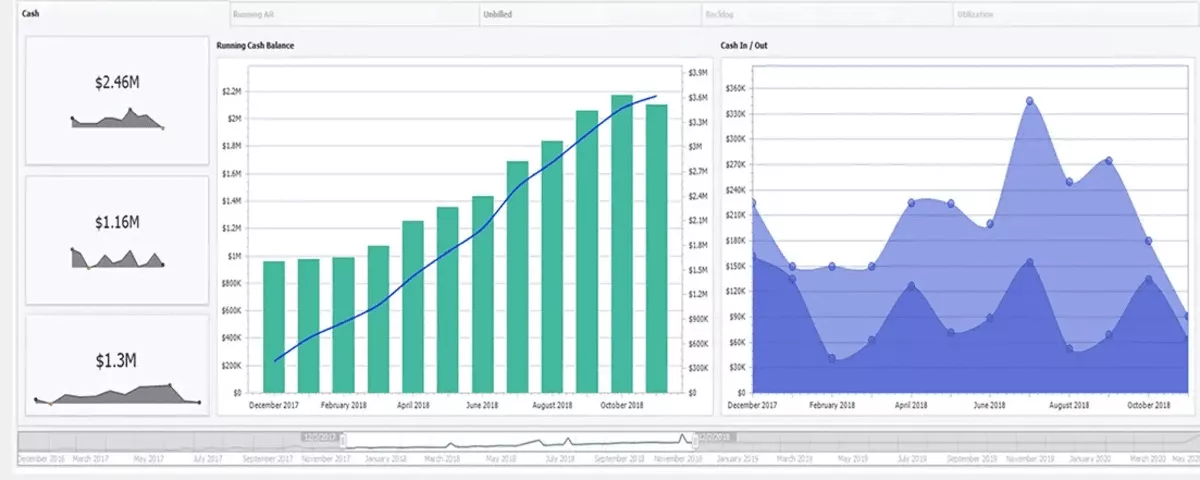
Unanet GovCon is project ERP built around federal contract compliance, covering DCAA audit readiness and indirect rate structures. No ERP is DCAA certified, so what it does is help your accounting system pass a review.
Key Features
- DCAA-compliant timekeeping with audit trails
- Indirect rate and cost pool management
- Subcontractor and contract management with tracking billing
- Time tracking and expense capture feeding employee utilization
SOurce: Unanet GovCon
Pros
- Month-end close becomes routine. Long-term users describe closing the books without drama once projects are set up properly.
- Indirect rate calculations post without a fight. Funding and project tracking sit alongside them, which keeps rate structures auditable.
- Fewer steps than the heavier compliance suites. Finance staff moving from a larger system find the same tasks take less clicking.
Cons
- Contract line item structures are missing. There is no way to handle CLINs, SLINs or ACRNs in software sold for federal work.
- Report sprawl makes the right one hard to find. Some reports export to a spreadsheet and others do not, with no obvious pattern.
- Project names differ between screens. Telling someone how to charge their time is harder when the assigner and the timesheet show different formats.
Who Should Skip Unanet GovCon?
Unanet GovCon is the wrong ERP system for professional services firms holding no federal contracts. You pay for a compliance regime that does not apply, and resource management gains nothing you lacked.
10. Odoo – Best for Small Firms Testing Open Source
Odoo is a modular open-source ERP system where you switch on only the apps you need. The Community edition is free to self-host, and readying it for services work is configuration, not a setting.
Key Features
- Project management and time tracking on one database
- Invoicing system with accounting and bank reconciliation
- Customer relationship management alongside project tracking
- Gantt charts and workflow automation across modules
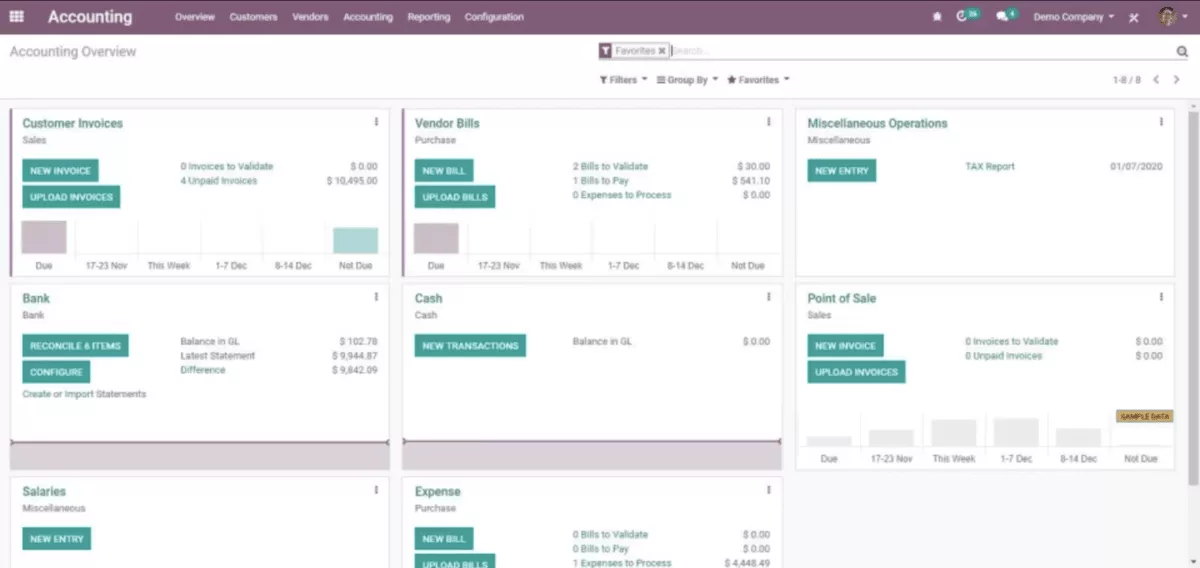
SOurce: odoo
Pros
- You can start with two apps and grow. Firms manage projects on two modules first, then add more as work changes.
- The community library fills real gaps. Open-source modules let you adjust most processes without a development team.
- An open API connects the tools you keep. Outside tools can read and write without a paid connector.
Cons
- Core depth is thin out of the box. Central accounting areas need building before they carry real work.
- Performance drops as modules pile up. Larger installs running many customizations slow down noticeably.
- Country-specific setup guidance is hard to find. Solving a local tax question often takes far longer than it should.
Who Should Skip Odoo?
Odoo is wrong for professional services firms with no developer capacity and no partner budget. Community has no official support and no multi-company handling, so finance will not sign off on the numbers.
How Do You Choose the Right ERP for Your Professional Services Firm?
You choose the right ERP by testing each candidate against your own paperwork. Open last month’s close pack, then count your legal entities and billing models. Hand two signed contracts to every vendor and watch them build the revenue schedule.
Then run the shortlist on one live engagement for a full billing cycle.
Step 1: Decide Whether You Need an ERP or a PSA
Pull your last month-end close pack. Open the system your delivery team logs billable hours in. If those are two systems, count how often someone moves data between them by hand.
Once a month is a process; every week is a system problem. A monthly handoff is one defined task. A weekly one means the systems disagree faster than anyone reconciles them.
Professional services automation, or PSA, runs projects, resourcing and billing. It then hands its numbers to your accounting system. An enterprise resource planning system carries the ledger and closes the month itself.
- Pass: your accountant produces a profit figure for one project without exporting anything.
- Fail: project profit exists only in a spreadsheet somebody rebuilds monthly. That gap is what an ERP closes and the best PSA software will not.
Step 2: Count Your Legal Entities and Billing Models
Put last year’s statutory filings on the desk. Pull one invoice for every way you bill: fixed fee, time and materials, retainer, milestone. Those two numbers are your real business requirements.
More than one legal entity, or more than two billing models, changes the shortlist. That is where multi-entity consolidation and billing rules start deciding it.
Below that line, total cost of ownership rises with each entity you never use.
- Pass: the vendor shows profit across two of your entities, in two currencies, intercompany entries removed, on one screen.
- Fail: they demonstrate one entity and call the rest configurable. Insist on your own entity structure, not their sample data. Read how project accounting works first if the mechanics are new.
Step 3: Check How Your Revenue Gets Recognized
Take two signed contracts with different shapes. One fixed fee billed against project milestones, one time and materials on a retainer. Hand both over and watch the vendor configure each and produce the revenue schedule.
If a quarter of your revenue bills in one month and delivers in another, this step decides the purchase.
Revenue recognition means booking revenue in the month the work was delivered.
- Pass: both schedules appear with unbilled project revenue aging visible per project, and no monthly journal entry.
- Fail: the answer involves your accountant posting an adjustment. That adjustment is the work you are buying the system to remove.
For fixed fee, head over to our article on recognizing revenue on milestones.
Step 4: Test the Handoff From Won Deal to Staffed Project
Pick one deal you closed last quarter. Bring the staffing assumptions you priced it on. Walk the vendor from that quote to a staffed project with a budget, using your rates.
Professional services firms that regularly win work they cannot staff save the most here.
- Pass: proposal roles and rates appear in the project without retyping. Resource allocation changes update the project margin on the same screen.
- Fail: project management and resource planning get demonstrated in separate sessions.
That usually means two separate systems underneath. Ask what happens to project timelines when one person drops out. That is where delivery risks surface.
Step 5: Run the Shortlist Against One Live Engagement
Choose one active engagement with real logged time, real approved leave and one applied change order. Sample data hides every problem you are looking for. Run the shortlisted ERP system for one full billing cycle, thirty days minimum, alongside what you use today.
Test customer support and data security in the same window, because both are easier to judge under real conditions.
Two fail conditions, and either one is enough on its own:
- The invoice the new system produces does not match the one you actually sent.
- Or the person who maintains the current spreadsheet is still quietly using it.
How Do You Roll Out and Migrate to a New Professional Services ERP?
You roll out a new ERP by agreeing the chart of accounts and project structure with finance. Export your rate card, open projects and open receivables, then import nothing else.
Run one billing cycle in both systems and reconcile the receivables ageing. Only then make the old system read-only and close a month in the new one. Most ERP system implementation failures in professional services firms happen before the data moves.
ERP System Migration Checklist
Before you import anything
- Name one owner for the migration and one person who settles disputes
- Agree the chart of accounts and the project dimension structure in writing with finance
- Decide what history moves over: open projects and open receivables only, not closed years
- Export the rate card, the project list with contract values, and the open invoice ledger
- Write down what counts as a billable hour and have finance and delivery both sign it
- Map every billing model you use to a billing rule, then name the one with no clean equivalent
Running in parallel
- Run one full billing cycle in both systems, not one week
- Reconcile the revenue schedule and receivables ageing across both billing cycles
- Log every mismatch with its cause, then fix the cause rather than the entry
- Push one change order and one credit note end to end before trusting the billing rules
- Check that time tracking totals match between the two systems every Friday
- Book your ERP consultants for the parallel period, not just the build
Switching over
- Set the date the old system becomes read-only and tell everyone who invoices
- Close the first month in the new invoicing system with the old one available but unused
- Give project managers view access to their own project profit figures on day one
- Run user training against your own live data, never the vendor’s sample company
- Review invoice accuracy and days-to-invoice after that first close, then fix what the numbers show
- Keep a direct line to customer support open for the whole first close
Two things decide whether this works. The business processes have to be agreed before the data moves. Rebuild the engagement you piloted on first, because you already know what its numbers should say.
Closing Thoughts on the Best Tool for Professional Service Providers
Most professional services firms get more from one all-in-one system than from ERP software joined to three other tools. Every integration is another place the numbers can disagree at month end.
The friction shows first when business growth speeds everything up.
Productive keeps sales, delivery, resourcing and billing on one record, with no separate ledger to reconcile. Book a demo and start today.
Connect With Agency Peers
Access agency-related Slack channels, exchange business insights, and join in on members-only live sessions.
